

OpenFE Showcase: Relative Binding Free Energies in the TYK2 System#
Introduction#
Welcome to the Open Free Energy toolkit! openfe is an open-source package for planning, running and analyzing alchemical free energy calculations.
In this showcase we calculate relative binding free energies (RBFEs) for a congeneric series of ligands binding to tyrosine kinase 2 (TYK2), using the Relative Hybrid Topology Protocol. Along the way, we introduce the main building blocks of openfe and the choices you can make at each step, such as:
Atom mappers
Scorers (for atom mappings)
Ligand networks
Other protocols: This showcase focuses on relative binding free energy (RBFE) calculations using a hybrid topology approach. openfe also provides protocols for:
Outline#
Setup for Google Colab
Overview
Background: hybrid topology RBFEs
The TYK2 inputs
Assigning partial charges
Atom mappings and scoring
Ligand networks
Protocol settings
Creating transformations
Running the calculations
Results
Analysing results with cinnabar
Next steps
1. Overview#
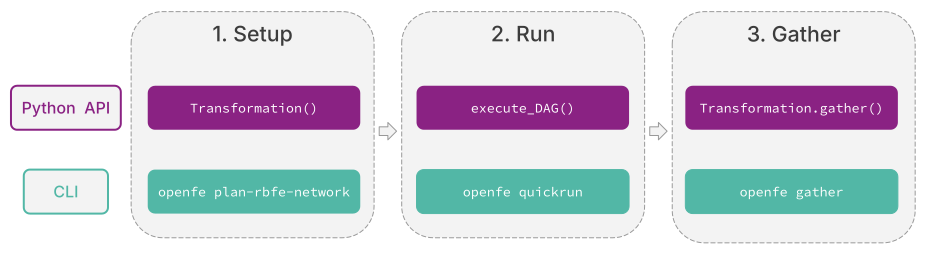
An openfe calculation has three stages:
Setup: load the protein and ligands, decide which ligand pairs to compare, and define how each transformation is simulated.
Run: execute the simulations, usually on GPUs.
Gather: combine the simulation outputs into free energy estimates and analyze them.
Each stage can be carried out with the Python API or with the command line interface (CLI). This notebook uses the Python API for planning, and the CLI for running and gathering, which is how most production campaigns are run.
Which protocol? The Relative Hybrid Topology Protocol used here works best for ligands that share a common core, such as this TYK2 series. For chemically diverse ligands, such as scaffold hops, the Separated Topologies Protocol is usually a better choice. See Choosing a protocol.
Tutorials for the other protocols: Separated Topologies · Absolute binding · Absolute hydration · Molecular dynamics
2. Background: hybrid topology RBFEs#
We compute the difference in binding free energy between two ligands, ΔΔG, from two alchemical simulations (solvent and complex legs), each sampled over a series of λ windows with replica exchange. openfe represents both ligands as one hybrid molecule, so the ligands need a common core.
More background: thermodynamic cycle, λ schedule and hybrid topologies
The thermodynamic cycle
Rather than computing each ligand’s binding free energy directly, we compute the difference in binding free energy between two ligands, ΔΔG, using a thermodynamic cycle:
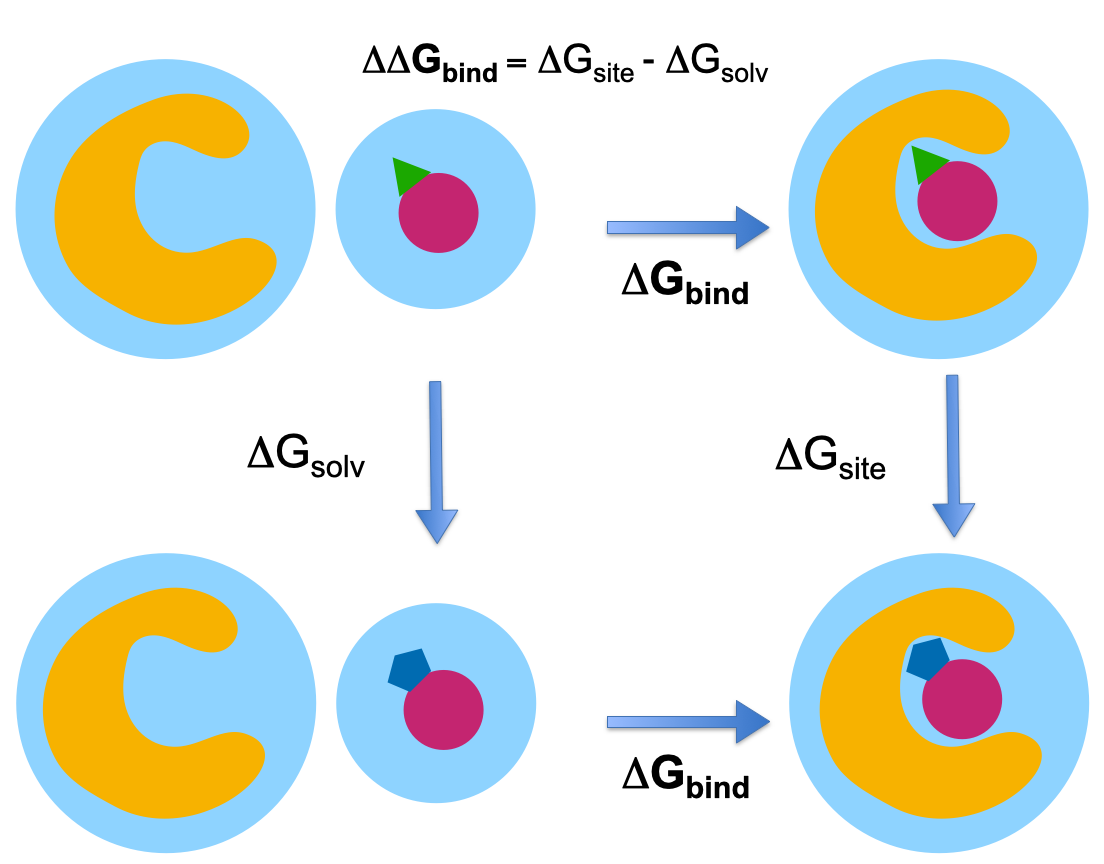
The horizontal legs (binding) are very hard to converge, so instead we simulate the vertical legs, alchemically transforming ligand A into ligand B both in solvent and in the protein-bound complex:
Every ligand pair therefore needs two simulations: a solvent leg and a complex leg.
Sampling along the alchemical path
The transformation from A to B is controlled by a coupling parameter, λ, which interpolates the interactions of the atoms that differ between the two ligands. The system is simulated at a series of discrete λ values (λ windows), chosen so that neighbouring windows overlap, and the free energy is estimated from all windows with the multistate Bennett acceptance ratio (MBAR).
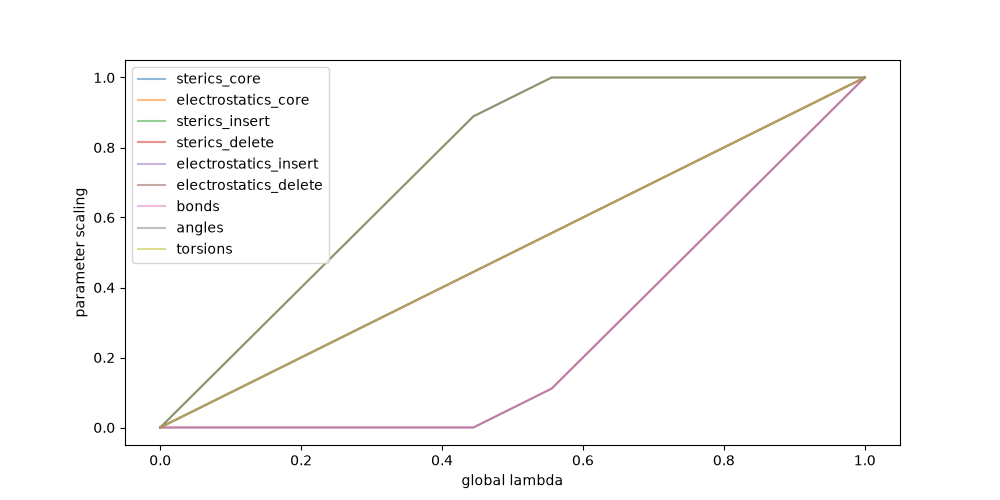
To improve sampling, openfe uses Hamiltonian replica exchange (HREX), where swaps between neighbouring windows are attempted at regular intervals. This lets configurations move along the alchemical path and escape local minima.
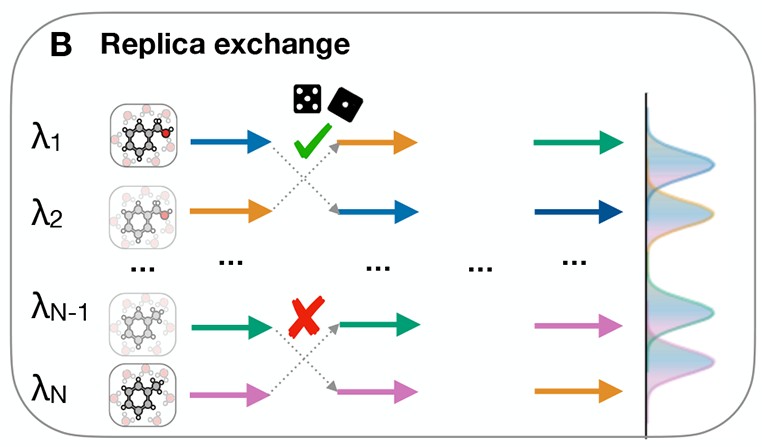
HREX sampling across λ windows, reproduced from Mey et al., Best Practices for Alchemical Free Energy Calculations.
The hybrid topology approach
In a hybrid topology, both ligands are represented by a single combined molecule. Atoms shared by the two ligands (the core) are interpolated between their parameters in A and B, while atoms unique to either ligand are switched on or off as dummy atoms. Because only the differing atoms are perturbed, these transformations are usually cheaper to converge than perturbing whole molecules.
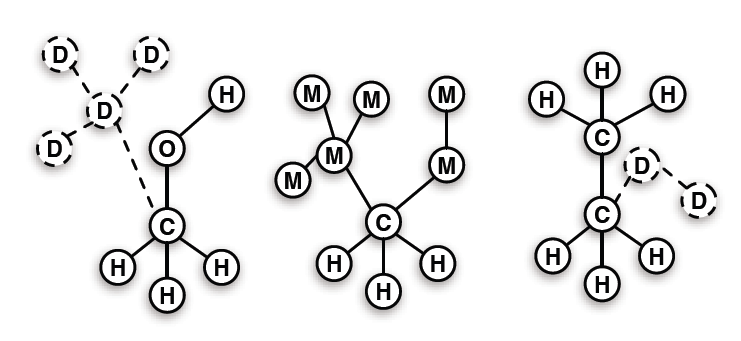
Hybrid topology scheme, reproduced from the alchemistry.org wiki.
The terminology varies across the literature: the approach called “hybrid topology” here is described elsewhere as “single topology” or “dual topology”.
This approach comes with some requirements:
A common core. Ligands must share enough of their scaffold for a sensible atom mapping. Transformations with many appearing or disappearing atoms converge poorly.
Aligned poses. The common core must occupy the same position in both ligands’ input poses. This is why the TYK2 ligands are provided pre-aligned.
Similar binding modes. Large differences in binding mode between ligands are hard to capture.
Dummy atom approximations. The treatment of dummy atoms can introduce systematic errors (see Fleck et al., 2021).
The Relative Hybrid Topology Protocol builds on the hybrid topology implementation originally developed in perses by the Chodera lab and collaborators, and on the multistate sampling tools in OpenMMTools. We are grateful to their developers for making this work openly available. If you use this protocol, please also consider citing perses (Rufa et al., 2023).
Learn more:
User guide: Relative Hybrid Topology Protocol – how the protocol works (the hybrid topology, the λ schedule and sampling), and the analysis it produces.
3. The TYK2 inputs#
The inputs for this showcase are in inputs/:
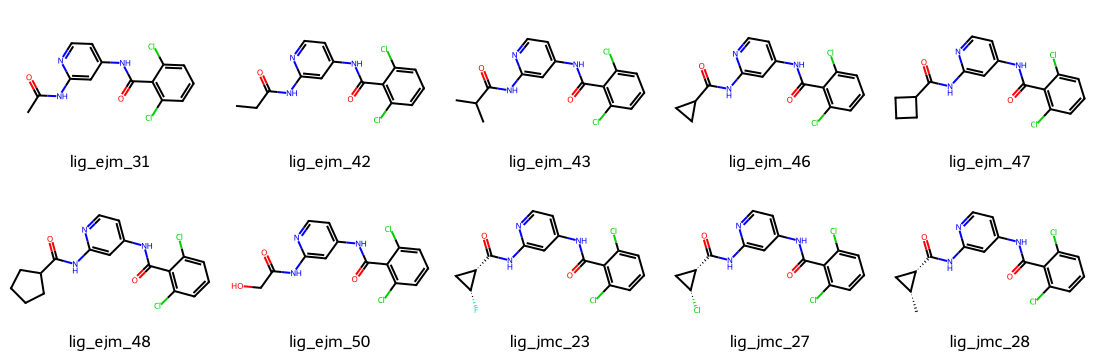
tyk2_protein.pdb: the prepared (capped and protonated) TYK2 protein.tyk2_ligands.sdf: ten ligands with their binding poses, aligned on their common core.
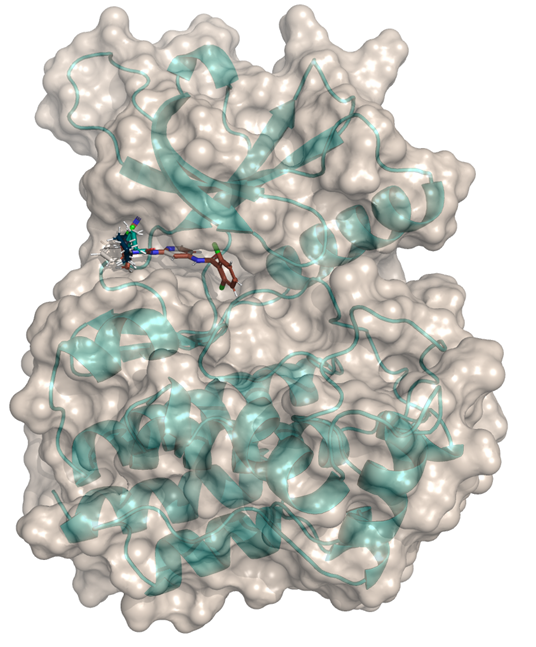
openfe does not prepare structures. Protonation, modelling of missing residues and generation of ligand poses must be done beforehand. See Preparing input structures for what openfe expects.
Let’s look at the ligands in 2D:
[1]:
import openfe
from rdkit import Chem
from rdkit.Chem import AllChem, Draw

# Load the ligands without hydrogens for a clearer 2D depiction
ligand_rdmols_2d = [mol for mol in Chem.SDMolSupplier("inputs/tyk2_ligands.sdf", removeHs=True)]
for mol in ligand_rdmols_2d:
    AllChem.Compute2DCoords(mol)

Draw.MolsToGridImage(
    ligand_rdmols_2d,
    legends=[mol.GetProp("_Name") for mol in ligand_rdmols_2d],
    molsPerRow=5,
    subImgSize=(220, 180),
)
[1]:
And one of them in its binding pose (left-click and drag to rotate, scroll to zoom):
[3]:
import MDAnalysis as mda
import py3Dmol
from MDAnalysis.lib.distances import capped_distance

example_ligand = Chem.MolFromMolBlock(
    Chem.MolToMolBlock(next(Chem.SDMolSupplier("inputs/tyk2_ligands.sdf", removeHs=True)))
)
protein_mda = mda.Universe("inputs/tyk2_protein.pdb")

# Protein residues with any atom within 5 Å of the ligand
pairs = capped_distance(
    example_ligand.GetConformer().GetPositions(),
    protein_mda.atoms.positions,
    max_cutoff=5.0,
    return_distances=False,
)
binding_site_resids = sorted(set(protein_mda.atoms[pairs[:, 1]].resids.tolist()))

view = py3Dmol.view(width=600, height=400)
with open("inputs/tyk2_protein.pdb") as pdb_file:
    view.addModel(pdb_file.read(), "pdb")
view.addModel(Chem.MolToMolBlock(example_ligand), "mol")

view.setStyle({"model": 0}, {"cartoon": {"color": "lightgrey"}})
view.addStyle({"model": 0, "resi": binding_site_resids}, {"stick": {"colorscheme": "greyCarbon"}})
view.setStyle({"model": 1}, {"stick": {"colorscheme": "cyanCarbon"}})
view.zoomTo({"model": 1})
view.zoom(0.6)
view.show()
3Dmol.js failed to load for some reason. Please check your browser console for error messages.
Creating openfe Components#
openfe represents each part of a system as a Component.
Ligands (and if present cofactors) are SmallMoleculeComponents, created here from RDKit molecules, which keep the 3D coordinates, bond orders and names from the SDF file:
[4]:
ligands = [
    openfe.SmallMoleculeComponent.from_rdkit(mol)
    for mol in Chem.SDMolSupplier("inputs/tyk2_ligands.sdf", removeHs=False)
]
print([ligand.name for ligand in ligands])
['lig_ejm_31', 'lig_ejm_42', 'lig_ejm_43', 'lig_ejm_46', 'lig_ejm_47', 'lig_ejm_48', 'lig_ejm_50', 'lig_jmc_23', 'lig_jmc_27', 'lig_jmc_28']
Working with OpenFF Molecules#
SmallMoleculeComponents can also be created from OpenFF Molecules, which is useful if you already prepare or charge your ligands with the OpenFF toolkit. Here we load the same ligands with the OpenFF toolkit:
[5]:
from openff.toolkit import Molecule

openff_ligands = Molecule.from_file("inputs/tyk2_ligands.sdf")
ligands_from_openff = [openfe.SmallMoleculeComponent.from_openff(mol) for mol in openff_ligands]
print([ligand.name for ligand in ligands_from_openff])
['lig_ejm_31', 'lig_ejm_42', 'lig_ejm_43', 'lig_ejm_46', 'lig_ejm_47', 'lig_ejm_48', 'lig_ejm_50', 'lig_jmc_23', 'lig_jmc_27', 'lig_jmc_28']
SmallMoleculeComponents can be converted back to RDKit or OpenFF molecules at any point, for example to use other toolkits for analysis:
[6]:
openff_molecule = ligands[0].to_openff()
rdkit_molecule = ligands[0].to_rdkit()
The protein is loaded as a ProteinComponent, which also holds any crystallographic waters and ions in the PDB file.
The solvent is a SolventComponent which describes the composition of the solvent (here water with 0.15 M NaCl, neutralizing the system) rather than explicit water positions. The size and shape of the box and the water model are not part of the SolventComponent, they are set in the protocol’s solvation_settings, covered in Section 7.
[7]:
from openff.units import unit

protein = openfe.ProteinComponent.from_pdb_file("inputs/tyk2_protein.pdb")
solvent = openfe.SolventComponent(
    positive_ion="Na",
    negative_ion="Cl",
    neutralize=True,
    ion_concentration=0.15 * unit.molar,
)
Learn more:
How to: Loading molecules and chemical systems – how to create components from SDF and PDB files or from RDKit and OpenFF molecules, and combine them into a
ChemicalSystem.User guide: Components, chemical systems and thermodynamic cycles – which component types exist, and how chemical systems define the end states of each leg of a calculation.
4. Assigning partial charges#
Partial charges are assigned during setup if they are missing, but we recommend assigning them once, up front. Conventional methods such as AM1-BCC are not perfectly reproducible. Small differences between runs (of the order of 0.03 e) are common, and if a ligand ends up with slightly different charges in its solvent and complex legs, the error enters the thermodynamic cycle (Osato et al., 2025). Charging once and reusing the charges avoids this.
Here we use OpenFF NAGL with the AshGC model, a graph neural network that reproduces AM1BCCELF10 charges in a fraction of the time. It is also the charge model the OpenFF 2.3.0 force field was fitted with (Wang et al., 2026), which we use in section 7.
From the CLI, the same step is openfe charge-molecules.
[8]:
from openfe.protocols.openmm_utils.charge_generation import bulk_assign_partial_charges

ligands = bulk_assign_partial_charges(
    molecules=ligands,
    overwrite=False,
    method="nagl",
    toolkit_backend="ambertools",
    generate_n_conformers=None,
    nagl_model="openff-gnn-am1bcc-1.0.0.pt",
    processors=1,
)

# The charges are stored on the Component and carried through to the simulations
ligands[0].to_openff().partial_charges
Generating charges: 100%|███████████████████████| 10/10 [00:05<00:00, 2.00it/s]
[8]:
| Magnitude | [0.1448139477870427 -0.09448049921775237 -0.12968765903497115 0.05276030342793092 -0.135585687647108 0.05276030342793092 -0.12968765903497115 0.15515131544088945 -0.06017462123418227 0.6910391975543462 -0.5483320425846614 -0.48030141700292006 0.3238180209300481 0.1279890764853917 -0.26826892007375136 0.44780837785219774 -0.7103845547535457 0.5609757829806767 -0.3414706062176265 0.13770612369989976 -0.5591573785641231 0.31294750462984666 0.6885952283046208 -0.5529239248135127 -0.18056669045472518 0.06981571804499254 0.06981571804499254 0.06981571804499254 0.021423640137072653 0.1688089896342717 -0.06017462123418227 0.15515131544088945] |
|---|---|
| Units | elementary_charge |
Learn more:
How to: Assigning partial charges – with the Python API.
How to: Generating partial charges with the CLI – with
openfe charge-molecules.
5. Atom mappings and scoring#
Mapping two ligands#
In a hybrid topology RBFE, an atom mapping defines which atoms are shared by two ligands (and interpolated) and which are unique (and become dummy atoms). openfe provides two atom mappers:
KartografAtomMapper, which maps atoms based on their 3D positions (Ries et al., 2024). It is the default in the CLI and, in our hands, performs best, especially for ligands that are well aligned on their common core.LomapAtomMapper, which maps atoms based on the maximum common substructure (MCS).
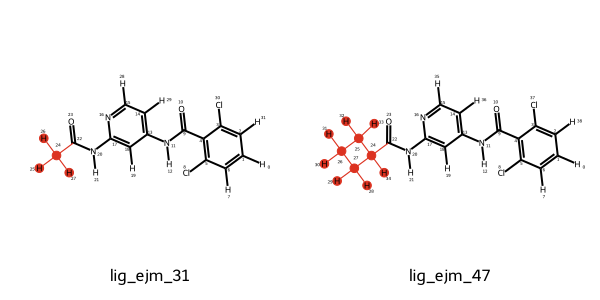
Let’s map lig_ejm_31 to lig_ejm_47:
1. ``KartografAtomMapper``
[9]:
ligands_by_name = {ligand.name: ligand for ligand in ligands}

mapper = openfe.KartografAtomMapper()
mapping = next(mapper.suggest_mappings(ligands_by_name["lig_ejm_31"], ligands_by_name["lig_ejm_47"]))
mapping
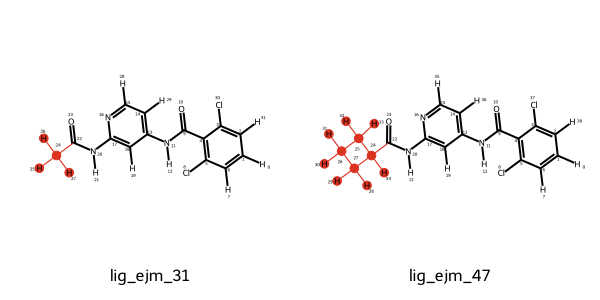
In the 2D depiction, atoms unique to one ligand are shown in red, and mapped atoms that change element are shown in blue.
The same mapping can be viewed in 3D. The two ligands are shown left and right, and their overlay in the middle. Atoms with spheres of the same colour are mapped; atoms without a sphere are unique to that ligand.
[10]:
mapping.view_3d(show_atomIDs=True)
3Dmol.js failed to load for some reason. Please check your browser console for error messages.
[10]:
<py3Dmol.view at 0x30812df90>
Under the hood, the mapping is a dictionary from atom indices in ligand A to atom indices in ligand B. Atoms missing from it are unique:
[11]:
mapping.componentA_to_componentB
[11]:
{0: 0,
 7: 38,
 12: 12,
 19: 19,
 21: 21,
 28: 35,
 29: 36,
 31: 7,
 1: 1,
 2: 6,
 3: 5,
 4: 4,
 5: 3,
 6: 2,
 8: 37,
 9: 9,
 10: 10,
 11: 11,
 13: 13,
 14: 14,
 15: 15,
 16: 16,
 17: 17,
 18: 18,
 20: 20,
 22: 22,
 23: 23,
 30: 8}
2. ``LomapAtomMapper``
Alternatively, mappings can be generated using the MCS-based LomapAtomMapper. For more information on configuring and using this mapper, see the ligand network generation cookbook.
[12]:
mapper = openfe.LomapAtomMapper()
lomap_mapping = next(mapper.suggest_mappings(ligands_by_name["lig_ejm_31"], ligands_by_name["lig_ejm_47"]))
lomap_mapping
Scoring a mapping#
To decide which ligand pairs to simulate, each mapping needs to be given a score between 0 (hardest) and 1 (easiest). The default LOMAP score applies empirical rules that penalize transformations known to be difficult, such as those with many unique atoms or ring changes:
[13]:
openfe.lomap_scorers.default_lomap_score(mapping)
[13]:
0.33287108369807955
This pair scores only about 0.33: replacing the methyl group of lig_ejm_31 with the cyclobutyl group of lig_ejm_47 means 4 atoms disappear and 11 appear. For comparison, lig_ejm_31 to lig_ejm_50 differs only by a small substituent change and scores about 0.9:
[14]:
easier_mapping = next(mapper.suggest_mappings(ligands_by_name["lig_ejm_31"], ligands_by_name["lig_ejm_50"]))
openfe.lomap_scorers.default_lomap_score(easier_mapping)
[14]:
0.9048374180359595
6. Ligand networks#
Simulating every possible ligand pair would be expensive, and some pairs would not map well. Instead, a network planner uses the mapper and scorer to select a set of transformations that connects all ligands. The result is a LigandNetwork, whose nodes are ligands and whose edges are atom mappings.
Here we compare three common network types:
A radial network (also called a star map), which connects every ligand to one central ligand. It suits exploring analogues of a single reference compound, but every edge has to go through that ligand, however poorly some pairs map, and the network has no cycles.
A minimal spanning tree (MST), which uses the fewest, best-scored edges needed to connect every ligand. This is the CLI default.
A LOMAP network, built with the rules of the LOMAP planner: starting from the scored candidate edges, it removes edges as long as every ligand stays part of a cycle and no two ligands end up more than six edges apart. The cycles give a consistency check on the results, and keep the network connected if an edge fails.
[15]:
# Create network from the two molecules
import openfe
from openfe.setup.ligand_network_planning import generate_radial_network
from openfe.setup.ligand_network_planning import generate_minimal_spanning_network
from openfe.setup.ligand_network_planning import generate_lomap_network
from openfe.setup import KartografAtomMapper

# Create a radial, choosing the first ligand as central ligand
radial_network = generate_radial_network(
    ligands=ligands[1:],
    central_ligand=ligands[0],
    mappers=[KartografAtomMapper(),])

# Create an MST network
mst_network = generate_minimal_spanning_network(
    ligands=ligands,
    scorer=openfe.lomap_scorers.default_lomap_score,
    mappers=[KartografAtomMapper(),])

# Create a LOMAP network
lomap_network = generate_lomap_network(
    ligands=ligands,
    scorer=openfe.lomap_scorers.default_lomap_score,
    mappers=[KartografAtomMapper(),])

print(f"Radial network: {len(radial_network.edges)} edges")
print(f"MST: {len(mst_network.edges)} edges")
print(f"LOMAP network: {len(lomap_network.edges)} edges")
INFO:   #################################
INFO:   Map Heavy Atoms
INFO:   #################################
INFO:   Masking Atoms
INFO:   Build Distance Matrix
INFO:   Calculate Mapping
INFO:   Find Maximal overlapping connected sets of mapped atoms
INFO:   #################################
INFO:   Map Hydrogen Atoms:
INFO:   #################################
INFO:   Masking Atoms
INFO:   Build Distance Matrix
INFO:   Calculate Mapping
INFO:   Find Maximal overlapping connected sets of mapped atoms
INFO:   Filtering bond breaks
INFO:   #################################
INFO:   Map Heavy Atoms
INFO:   #################################
INFO:   Masking Atoms
INFO:   Build Distance Matrix
INFO:   Calculate Mapping
INFO:   Find Maximal overlapping connected sets of mapped atoms
INFO:   #################################
INFO:   Map Hydrogen Atoms:
INFO:   #################################
INFO:   Masking Atoms
INFO:   Build Distance Matrix
INFO:   Calculate Mapping
INFO:   Find Maximal overlapping connected sets of mapped atoms
INFO:   Filtering bond breaks
INFO:   #################################
INFO:   Map Heavy Atoms
INFO:   #################################
INFO:   Masking Atoms
INFO:   Build Distance Matrix
INFO:   Calculate Mapping
INFO:   Find Maximal overlapping connected sets of mapped atoms
INFO:   #################################
INFO:   Map Hydrogen Atoms:
INFO:   #################################
INFO:   Masking Atoms
INFO:   Build Distance Matrix
INFO:   Calculate Mapping
INFO:   Find Maximal overlapping connected sets of mapped atoms
INFO:   Filtering bond breaks
INFO:   #################################
INFO:   Map Heavy Atoms
INFO:   #################################
INFO:   Masking Atoms
INFO:   Build Distance Matrix
INFO:   Calculate Mapping
INFO:   Find Maximal overlapping connected sets of mapped atoms
INFO:   #################################
INFO:   Map Hydrogen Atoms:
INFO:   #################################
INFO:   Masking Atoms
INFO:   Build Distance Matrix
INFO:   Calculate Mapping
INFO:   Find Maximal overlapping connected sets of mapped atoms
INFO:   Filtering bond breaks
INFO:   #################################
INFO:   Map Heavy Atoms
INFO:   #################################
INFO:   Masking Atoms
INFO:   Build Distance Matrix
INFO:   Calculate Mapping
INFO:   Find Maximal overlapping connected sets of mapped atoms
INFO:   #################################
INFO:   Map Hydrogen Atoms:
INFO:   #################################
INFO:   Masking Atoms
INFO:   Build Distance Matrix
INFO:   Calculate Mapping
INFO:   Find Maximal overlapping connected sets of mapped atoms
INFO:   Filtering bond breaks
INFO:   #################################
INFO:   Map Heavy Atoms
INFO:   #################################
INFO:   Masking Atoms
INFO:   Build Distance Matrix
INFO:   Calculate Mapping
INFO:   Find Maximal overlapping connected sets of mapped atoms
INFO:   #################################
INFO:   Map Hydrogen Atoms:
INFO:   #################################
INFO:   Masking Atoms
INFO:   Build Distance Matrix
INFO:   Calculate Mapping
INFO:   Find Maximal overlapping connected sets of mapped atoms
INFO:   Filtering bond breaks
INFO:   #################################
INFO:   Map Heavy Atoms
INFO:   #################################
INFO:   Masking Atoms
INFO:   Build Distance Matrix
INFO:   Calculate Mapping
INFO:   Find Maximal overlapping connected sets of mapped atoms
INFO:   #################################
INFO:   Map Hydrogen Atoms:
INFO:   #################################
INFO:   Masking Atoms
INFO:   Build Distance Matrix
INFO:   Calculate Mapping
INFO:   Find Maximal overlapping connected sets of mapped atoms
INFO:   Filtering bond breaks
INFO:   #################################
INFO:   Map Heavy Atoms
INFO:   #################################
INFO:   Masking Atoms
INFO:   Build Distance Matrix
INFO:   Calculate Mapping
INFO:   Find Maximal overlapping connected sets of mapped atoms
INFO:   #################################
INFO:   Map Hydrogen Atoms:
INFO:   #################################
INFO:   Masking Atoms
INFO:   Build Distance Matrix
INFO:   Calculate Mapping
INFO:   Find Maximal overlapping connected sets of mapped atoms
INFO:   Filtering bond breaks
INFO:   #################################
INFO:   Map Heavy Atoms
INFO:   #################################
INFO:   Masking Atoms
INFO:   Build Distance Matrix
INFO:   Calculate Mapping
INFO:   Find Maximal overlapping connected sets of mapped atoms
INFO:   #################################
INFO:   Map Hydrogen Atoms:
INFO:   #################################
INFO:   Masking Atoms
INFO:   Build Distance Matrix
INFO:   Calculate Mapping
INFO:   Find Maximal overlapping connected sets of mapped atoms
INFO:   Filtering bond breaks
INFO:   #################################
INFO:   Map Heavy Atoms
INFO:   #################################
INFO:   Masking Atoms
INFO:   Build Distance Matrix
INFO:   Calculate Mapping
INFO:   Find Maximal overlapping connected sets of mapped atoms
INFO:   #################################
INFO:   Map Hydrogen Atoms:
INFO:   #################################
INFO:   Masking Atoms
INFO:   Build Distance Matrix
INFO:   Calculate Mapping
INFO:   Find Maximal overlapping connected sets of mapped atoms
INFO:   Filtering bond breaks
INFO:   #################################
INFO:   Map Heavy Atoms
INFO:   #################################
INFO:   Masking Atoms
INFO:   Build Distance Matrix
INFO:   Calculate Mapping
INFO:   Find Maximal overlapping connected sets of mapped atoms
INFO:   #################################
INFO:   Map Hydrogen Atoms:
INFO:   #################################
INFO:   Masking Atoms
INFO:   Build Distance Matrix
INFO:   Calculate Mapping
INFO:   Find Maximal overlapping connected sets of mapped atoms
INFO:   Filtering bond breaks
INFO:   #################################
INFO:   Map Heavy Atoms
INFO:   #################################
INFO:   Masking Atoms
INFO:   Build Distance Matrix
INFO:   Calculate Mapping
INFO:   Find Maximal overlapping connected sets of mapped atoms
INFO:   #################################
INFO:   Map Hydrogen Atoms:
INFO:   #################################
INFO:   Masking Atoms
INFO:   Build Distance Matrix
INFO:   Calculate Mapping
INFO:   Find Maximal overlapping connected sets of mapped atoms
INFO:   Filtering bond breaks
INFO:   #################################
INFO:   Map Heavy Atoms
INFO:   #################################
INFO:   Masking Atoms
INFO:   Build Distance Matrix
INFO:   Calculate Mapping
INFO:   Find Maximal overlapping connected sets of mapped atoms
INFO:   #################################
INFO:   Map Hydrogen Atoms:
INFO:   #################################
INFO:   Masking Atoms
INFO:   Build Distance Matrix
INFO:   Calculate Mapping
INFO:   Find Maximal overlapping connected sets of mapped atoms
INFO:   Filtering bond breaks
INFO:   #################################
INFO:   Map Heavy Atoms
INFO:   #################################
INFO:   Masking Atoms
INFO:   Build Distance Matrix
INFO:   Calculate Mapping
INFO:   Find Maximal overlapping connected sets of mapped atoms
INFO:   #################################
INFO:   Map Hydrogen Atoms:
INFO:   #################################
INFO:   Masking Atoms
INFO:   Build Distance Matrix
INFO:   Calculate Mapping
INFO:   Find Maximal overlapping connected sets of mapped atoms
INFO:   Filtering bond breaks
INFO:   #################################
INFO:   Map Heavy Atoms
INFO:   #################################
INFO:   Masking Atoms
INFO:   Build Distance Matrix
INFO:   Calculate Mapping
INFO:   Find Maximal overlapping connected sets of mapped atoms
INFO:   #################################
INFO:   Map Hydrogen Atoms:
INFO:   #################################
INFO:   Masking Atoms
INFO:   Build Distance Matrix
INFO:   Calculate Mapping
INFO:   Find Maximal overlapping connected sets of mapped atoms
INFO:   Filtering bond breaks
INFO:   #################################
INFO:   Map Heavy Atoms
INFO:   #################################
INFO:   Masking Atoms
INFO:   Build Distance Matrix
INFO:   Calculate Mapping
INFO:   Find Maximal overlapping connected sets of mapped atoms
INFO:   #################################
INFO:   Map Hydrogen Atoms:
INFO:   #################################
INFO:   Masking Atoms
INFO:   Build Distance Matrix
INFO:   Calculate Mapping
INFO:   Find Maximal overlapping connected sets of mapped atoms
INFO:   Filtering bond breaks
INFO:   #################################
INFO:   Map Heavy Atoms
INFO:   #################################
INFO:   Masking Atoms
INFO:   Build Distance Matrix
INFO:   Calculate Mapping
INFO:   Find Maximal overlapping connected sets of mapped atoms
INFO:   #################################
INFO:   Map Hydrogen Atoms:
INFO:   #################################
INFO:   Masking Atoms
INFO:   Build Distance Matrix
INFO:   Calculate Mapping
INFO:   Find Maximal overlapping connected sets of mapped atoms
INFO:   Filtering bond breaks
INFO:   #################################
INFO:   Map Heavy Atoms
INFO:   #################################
INFO:   Masking Atoms
INFO:   Build Distance Matrix
INFO:   Calculate Mapping
INFO:   Find Maximal overlapping connected sets of mapped atoms
INFO:   #################################
INFO:   Map Hydrogen Atoms:
INFO:   #################################
INFO:   Masking Atoms
INFO:   Build Distance Matrix
INFO:   Calculate Mapping
INFO:   Find Maximal overlapping connected sets of mapped atoms
INFO:   Filtering bond breaks
INFO:   #################################
INFO:   Map Heavy Atoms
INFO:   #################################
INFO:   Masking Atoms
INFO:   Build Distance Matrix
INFO:   Calculate Mapping
INFO:   Find Maximal overlapping connected sets of mapped atoms
INFO:   #################################
INFO:   Map Hydrogen Atoms:
INFO:   #################################
INFO:   Masking Atoms
INFO:   Build Distance Matrix
INFO:   Calculate Mapping
INFO:   Find Maximal overlapping connected sets of mapped atoms
INFO:   Filtering bond breaks
INFO:   #################################
INFO:   Map Heavy Atoms
INFO:   #################################
INFO:   Masking Atoms
INFO:   Build Distance Matrix
INFO:   Calculate Mapping
INFO:   Find Maximal overlapping connected sets of mapped atoms
INFO:   #################################
INFO:   Map Hydrogen Atoms:
INFO:   #################################
INFO:   Masking Atoms
INFO:   Build Distance Matrix
INFO:   Calculate Mapping
INFO:   Find Maximal overlapping connected sets of mapped atoms
INFO:   Filtering bond breaks
INFO:   #################################
INFO:   Map Heavy Atoms
INFO:   #################################
INFO:   Masking Atoms
INFO:   Build Distance Matrix
INFO:   Calculate Mapping
INFO:   Find Maximal overlapping connected sets of mapped atoms
INFO:   #################################
INFO:   Map Hydrogen Atoms:
INFO:   #################################
INFO:   Masking Atoms
INFO:   Build Distance Matrix
INFO:   Calculate Mapping
INFO:   Find Maximal overlapping connected sets of mapped atoms
INFO:   Filtering bond breaks
INFO:   #################################
INFO:   Map Heavy Atoms
INFO:   #################################
INFO:   Masking Atoms
INFO:   Build Distance Matrix
INFO:   Calculate Mapping
INFO:   Find Maximal overlapping connected sets of mapped atoms
INFO:   #################################
INFO:   Map Hydrogen Atoms:
INFO:   #################################
INFO:   Masking Atoms
INFO:   Build Distance Matrix
INFO:   Calculate Mapping
INFO:   Find Maximal overlapping connected sets of mapped atoms
INFO:   Filtering bond breaks
INFO:   #################################
INFO:   Map Heavy Atoms
INFO:   #################################
INFO:   Masking Atoms
INFO:   Build Distance Matrix
INFO:   Calculate Mapping
INFO:   Find Maximal overlapping connected sets of mapped atoms
INFO:   #################################
INFO:   Map Hydrogen Atoms:
INFO:   #################################
INFO:   Masking Atoms
INFO:   Build Distance Matrix
INFO:   Calculate Mapping
INFO:   Find Maximal overlapping connected sets of mapped atoms
INFO:   Filtering bond breaks
INFO:   #################################
INFO:   Map Heavy Atoms
INFO:   #################################
INFO:   Masking Atoms
INFO:   Build Distance Matrix
INFO:   Calculate Mapping
INFO:   Find Maximal overlapping connected sets of mapped atoms
INFO:   #################################
INFO:   Map Hydrogen Atoms:
INFO:   #################################
INFO:   Masking Atoms
INFO:   Build Distance Matrix
INFO:   Calculate Mapping
INFO:   Find Maximal overlapping connected sets of mapped atoms
INFO:   Filtering bond breaks
INFO:   #################################
INFO:   Map Heavy Atoms
INFO:   #################################
INFO:   Masking Atoms
INFO:   Build Distance Matrix
INFO:   Calculate Mapping
INFO:   Find Maximal overlapping connected sets of mapped atoms
INFO:   #################################
INFO:   Map Hydrogen Atoms:
INFO:   #################################
INFO:   Masking Atoms
INFO:   Build Distance Matrix
INFO:   Calculate Mapping
INFO:   Find Maximal overlapping connected sets of mapped atoms
INFO:   Filtering bond breaks
INFO:   #################################
INFO:   Map Heavy Atoms
INFO:   #################################
INFO:   Masking Atoms
INFO:   Build Distance Matrix
INFO:   Calculate Mapping
INFO:   Find Maximal overlapping connected sets of mapped atoms
INFO:   #################################
INFO:   Map Hydrogen Atoms:
INFO:   #################################
INFO:   Masking Atoms
INFO:   Build Distance Matrix
INFO:   Calculate Mapping
INFO:   Find Maximal overlapping connected sets of mapped atoms
INFO:   Filtering bond breaks
INFO:   #################################
INFO:   Map Heavy Atoms
INFO:   #################################
INFO:   Masking Atoms
INFO:   Build Distance Matrix
INFO:   Calculate Mapping
INFO:   Find Maximal overlapping connected sets of mapped atoms
INFO:   #################################
INFO:   Map Hydrogen Atoms:
INFO:   #################################
INFO:   Masking Atoms
INFO:   Build Distance Matrix
INFO:   Calculate Mapping
INFO:   Find Maximal overlapping connected sets of mapped atoms
INFO:   Filtering bond breaks
INFO:   #################################
INFO:   Map Heavy Atoms
INFO:   #################################
INFO:   Masking Atoms
INFO:   Build Distance Matrix
INFO:   Calculate Mapping
INFO:   Find Maximal overlapping connected sets of mapped atoms
INFO:   #################################
INFO:   Map Hydrogen Atoms:
INFO:   #################################
INFO:   Masking Atoms
INFO:   Build Distance Matrix
INFO:   Calculate Mapping
INFO:   Find Maximal overlapping connected sets of mapped atoms
INFO:   Filtering bond breaks
INFO:   #################################
INFO:   Map Heavy Atoms
INFO:   #################################
INFO:   Masking Atoms
INFO:   Build Distance Matrix
INFO:   Calculate Mapping
INFO:   Find Maximal overlapping connected sets of mapped atoms
INFO:   #################################
INFO:   Map Hydrogen Atoms:
INFO:   #################################
INFO:   Masking Atoms
INFO:   Build Distance Matrix
INFO:   Calculate Mapping
INFO:   Find Maximal overlapping connected sets of mapped atoms
INFO:   Filtering bond breaks
INFO:   #################################
INFO:   Map Heavy Atoms
INFO:   #################################
INFO:   Masking Atoms
INFO:   Build Distance Matrix
INFO:   Calculate Mapping
INFO:   Find Maximal overlapping connected sets of mapped atoms
INFO:   #################################
INFO:   Map Hydrogen Atoms:
INFO:   #################################
INFO:   Masking Atoms
INFO:   Build Distance Matrix
INFO:   Calculate Mapping
INFO:   Find Maximal overlapping connected sets of mapped atoms
INFO:   Filtering bond breaks
INFO:   #################################
INFO:   Map Heavy Atoms
INFO:   #################################
INFO:   Masking Atoms
INFO:   Build Distance Matrix
INFO:   Calculate Mapping
INFO:   Find Maximal overlapping connected sets of mapped atoms
INFO:   #################################
INFO:   Map Hydrogen Atoms:
INFO:   #################################
INFO:   Masking Atoms
INFO:   Build Distance Matrix
INFO:   Calculate Mapping
INFO:   Find Maximal overlapping connected sets of mapped atoms
INFO:   Filtering bond breaks
INFO:   #################################
INFO:   Map Heavy Atoms
INFO:   #################################
INFO:   Masking Atoms
INFO:   Build Distance Matrix
INFO:   Calculate Mapping
INFO:   Find Maximal overlapping connected sets of mapped atoms
INFO:   #################################
INFO:   Map Hydrogen Atoms:
INFO:   #################################
INFO:   Masking Atoms
INFO:   Build Distance Matrix
INFO:   Calculate Mapping
INFO:   Find Maximal overlapping connected sets of mapped atoms
INFO:   Filtering bond breaks
INFO:   #################################
INFO:   Map Heavy Atoms
INFO:   #################################
INFO:   Masking Atoms
INFO:   Build Distance Matrix
INFO:   Calculate Mapping
INFO:   Find Maximal overlapping connected sets of mapped atoms
INFO:   #################################
INFO:   Map Hydrogen Atoms:
INFO:   #################################
INFO:   Masking Atoms
INFO:   Build Distance Matrix
INFO:   Calculate Mapping
INFO:   Find Maximal overlapping connected sets of mapped atoms
INFO:   Filtering bond breaks
INFO:   #################################
INFO:   Map Heavy Atoms
INFO:   #################################
INFO:   Masking Atoms
INFO:   Build Distance Matrix
INFO:   Calculate Mapping
INFO:   Find Maximal overlapping connected sets of mapped atoms
INFO:   #################################
INFO:   Map Hydrogen Atoms:
INFO:   #################################
INFO:   Masking Atoms
INFO:   Build Distance Matrix
INFO:   Calculate Mapping
INFO:   Find Maximal overlapping connected sets of mapped atoms
INFO:   Filtering bond breaks
INFO:   #################################
INFO:   Map Heavy Atoms
INFO:   #################################
INFO:   Masking Atoms
INFO:   Build Distance Matrix
INFO:   Calculate Mapping
INFO:   Find Maximal overlapping connected sets of mapped atoms
INFO:   #################################
INFO:   Map Hydrogen Atoms:
INFO:   #################################
INFO:   Masking Atoms
INFO:   Build Distance Matrix
INFO:   Calculate Mapping
INFO:   Find Maximal overlapping connected sets of mapped atoms
INFO:   Filtering bond breaks
INFO:   #################################
INFO:   Map Heavy Atoms
INFO:   #################################
INFO:   Masking Atoms
INFO:   Build Distance Matrix
INFO:   Calculate Mapping
INFO:   Find Maximal overlapping connected sets of mapped atoms
INFO:   #################################
INFO:   Map Hydrogen Atoms:
INFO:   #################################
INFO:   Masking Atoms
INFO:   Build Distance Matrix
INFO:   Calculate Mapping
INFO:   Find Maximal overlapping connected sets of mapped atoms
INFO:   Filtering bond breaks
INFO:   #################################
INFO:   Map Heavy Atoms
INFO:   #################################
INFO:   Masking Atoms
INFO:   Build Distance Matrix
INFO:   Calculate Mapping
INFO:   Find Maximal overlapping connected sets of mapped atoms
INFO:   #################################
INFO:   Map Hydrogen Atoms:
INFO:   #################################
INFO:   Masking Atoms
INFO:   Build Distance Matrix
INFO:   Calculate Mapping
INFO:   Find Maximal overlapping connected sets of mapped atoms
INFO:   Filtering bond breaks
INFO:   #################################
INFO:   Map Heavy Atoms
INFO:   #################################
INFO:   Masking Atoms
INFO:   Build Distance Matrix
INFO:   Calculate Mapping
INFO:   Find Maximal overlapping connected sets of mapped atoms
INFO:   #################################
INFO:   Map Hydrogen Atoms:
INFO:   #################################
INFO:   Masking Atoms
INFO:   Build Distance Matrix
INFO:   Calculate Mapping
INFO:   Find Maximal overlapping connected sets of mapped atoms
INFO:   Filtering bond breaks
INFO:   #################################
INFO:   Map Heavy Atoms
INFO:   #################################
INFO:   Masking Atoms
INFO:   Build Distance Matrix
INFO:   Calculate Mapping
INFO:   Find Maximal overlapping connected sets of mapped atoms
INFO:   #################################
INFO:   Map Hydrogen Atoms:
INFO:   #################################
INFO:   Masking Atoms
INFO:   Build Distance Matrix
INFO:   Calculate Mapping
INFO:   Find Maximal overlapping connected sets of mapped atoms
INFO:   Filtering bond breaks
INFO:   #################################
INFO:   Map Heavy Atoms
INFO:   #################################
INFO:   Masking Atoms
INFO:   Build Distance Matrix
INFO:   Calculate Mapping
INFO:   Find Maximal overlapping connected sets of mapped atoms
INFO:   #################################
INFO:   Map Hydrogen Atoms:
INFO:   #################################
INFO:   Masking Atoms
INFO:   Build Distance Matrix
INFO:   Calculate Mapping
INFO:   Find Maximal overlapping connected sets of mapped atoms
INFO:   Filtering bond breaks
INFO:   #################################
INFO:   Map Heavy Atoms
INFO:   #################################
INFO:   Masking Atoms
INFO:   Build Distance Matrix
INFO:   Calculate Mapping
INFO:   Find Maximal overlapping connected sets of mapped atoms
INFO:   #################################
INFO:   Map Hydrogen Atoms:
INFO:   #################################
INFO:   Masking Atoms
INFO:   Build Distance Matrix
INFO:   Calculate Mapping
INFO:   Find Maximal overlapping connected sets of mapped atoms
INFO:   Filtering bond breaks
INFO:   #################################
INFO:   Map Heavy Atoms
INFO:   #################################
INFO:   Masking Atoms
INFO:   Build Distance Matrix
INFO:   Calculate Mapping
INFO:   Find Maximal overlapping connected sets of mapped atoms
INFO:   #################################
INFO:   Map Hydrogen Atoms:
INFO:   #################################
INFO:   Masking Atoms
INFO:   Build Distance Matrix
INFO:   Calculate Mapping
INFO:   Find Maximal overlapping connected sets of mapped atoms
INFO:   Filtering bond breaks
INFO:   #################################
INFO:   Map Heavy Atoms
INFO:   #################################
INFO:   Masking Atoms
INFO:   Build Distance Matrix
INFO:   Calculate Mapping
INFO:   Find Maximal overlapping connected sets of mapped atoms
INFO:   #################################
INFO:   Map Hydrogen Atoms:
INFO:   #################################
INFO:   Masking Atoms
INFO:   Build Distance Matrix
INFO:   Calculate Mapping
INFO:   Find Maximal overlapping connected sets of mapped atoms
INFO:   Filtering bond breaks
INFO:   #################################
INFO:   Map Heavy Atoms
INFO:   #################################
INFO:   Masking Atoms
INFO:   Build Distance Matrix
INFO:   Calculate Mapping
INFO:   Find Maximal overlapping connected sets of mapped atoms
INFO:   #################################
INFO:   Map Hydrogen Atoms:
INFO:   #################################
INFO:   Masking Atoms
INFO:   Build Distance Matrix
INFO:   Calculate Mapping
INFO:   Find Maximal overlapping connected sets of mapped atoms
INFO:   Filtering bond breaks
INFO:   #################################
INFO:   Map Heavy Atoms
INFO:   #################################
INFO:   Masking Atoms
INFO:   Build Distance Matrix
INFO:   Calculate Mapping
INFO:   Find Maximal overlapping connected sets of mapped atoms
INFO:   #################################
INFO:   Map Hydrogen Atoms:
INFO:   #################################
INFO:   Masking Atoms
INFO:   Build Distance Matrix
INFO:   Calculate Mapping
INFO:   Find Maximal overlapping connected sets of mapped atoms
INFO:   Filtering bond breaks
INFO:   #################################
INFO:   Map Heavy Atoms
INFO:   #################################
INFO:   Masking Atoms
INFO:   Build Distance Matrix
INFO:   Calculate Mapping
INFO:   Find Maximal overlapping connected sets of mapped atoms
INFO:   #################################
INFO:   Map Hydrogen Atoms:
INFO:   #################################
INFO:   Masking Atoms
INFO:   Build Distance Matrix
INFO:   Calculate Mapping
INFO:   Find Maximal overlapping connected sets of mapped atoms
INFO:   Filtering bond breaks
INFO:   #################################
INFO:   Map Heavy Atoms
INFO:   #################################
INFO:   Masking Atoms
INFO:   Build Distance Matrix
INFO:   Calculate Mapping
INFO:   Find Maximal overlapping connected sets of mapped atoms
INFO:   #################################
INFO:   Map Hydrogen Atoms:
INFO:   #################################
INFO:   Masking Atoms
INFO:   Build Distance Matrix
INFO:   Calculate Mapping
INFO:   Find Maximal overlapping connected sets of mapped atoms
INFO:   Filtering bond breaks
INFO:   #################################
INFO:   Map Heavy Atoms
INFO:   #################################
INFO:   Masking Atoms
INFO:   Build Distance Matrix
INFO:   Calculate Mapping
INFO:   Find Maximal overlapping connected sets of mapped atoms
INFO:   #################################
INFO:   Map Hydrogen Atoms:
INFO:   #################################
INFO:   Masking Atoms
INFO:   Build Distance Matrix
INFO:   Calculate Mapping
INFO:   Find Maximal overlapping connected sets of mapped atoms
INFO:   Filtering bond breaks
INFO:   #################################
INFO:   Map Heavy Atoms
INFO:   #################################
INFO:   Masking Atoms
INFO:   Build Distance Matrix
INFO:   Calculate Mapping
INFO:   Find Maximal overlapping connected sets of mapped atoms
INFO:   #################################
INFO:   Map Hydrogen Atoms:
INFO:   #################################
INFO:   Masking Atoms
INFO:   Build Distance Matrix
INFO:   Calculate Mapping
INFO:   Find Maximal overlapping connected sets of mapped atoms
INFO:   Filtering bond breaks
INFO:   #################################
INFO:   Map Heavy Atoms
INFO:   #################################
INFO:   Masking Atoms
INFO:   Build Distance Matrix
INFO:   Calculate Mapping
INFO:   Find Maximal overlapping connected sets of mapped atoms
INFO:   #################################
INFO:   Map Hydrogen Atoms:
INFO:   #################################
INFO:   Masking Atoms
INFO:   Build Distance Matrix
INFO:   Calculate Mapping
INFO:   Find Maximal overlapping connected sets of mapped atoms
INFO:   Filtering bond breaks
INFO:   #################################
INFO:   Map Heavy Atoms
INFO:   #################################
INFO:   Masking Atoms
INFO:   Build Distance Matrix
INFO:   Calculate Mapping
INFO:   Find Maximal overlapping connected sets of mapped atoms
INFO:   #################################
INFO:   Map Hydrogen Atoms:
INFO:   #################################
INFO:   Masking Atoms
INFO:   Build Distance Matrix
INFO:   Calculate Mapping
INFO:   Find Maximal overlapping connected sets of mapped atoms
INFO:   Filtering bond breaks
INFO:   #################################
INFO:   Map Heavy Atoms
INFO:   #################################
INFO:   Masking Atoms
INFO:   Build Distance Matrix
INFO:   Calculate Mapping
INFO:   Find Maximal overlapping connected sets of mapped atoms
INFO:   #################################
INFO:   Map Hydrogen Atoms:
INFO:   #################################
INFO:   Masking Atoms
INFO:   Build Distance Matrix
INFO:   Calculate Mapping
INFO:   Find Maximal overlapping connected sets of mapped atoms
INFO:   Filtering bond breaks
INFO:   #################################
INFO:   Map Heavy Atoms
INFO:   #################################
INFO:   Masking Atoms
INFO:   Build Distance Matrix
INFO:   Calculate Mapping
INFO:   Find Maximal overlapping connected sets of mapped atoms
INFO:   #################################
INFO:   Map Hydrogen Atoms:
INFO:   #################################
INFO:   Masking Atoms
INFO:   Build Distance Matrix
INFO:   Calculate Mapping
INFO:   Find Maximal overlapping connected sets of mapped atoms
INFO:   Filtering bond breaks
INFO:   #################################
INFO:   Map Heavy Atoms
INFO:   #################################
INFO:   Masking Atoms
INFO:   Build Distance Matrix
INFO:   Calculate Mapping
INFO:   Find Maximal overlapping connected sets of mapped atoms
INFO:   #################################
INFO:   Map Hydrogen Atoms:
INFO:   #################################
INFO:   Masking Atoms
INFO:   Build Distance Matrix
INFO:   Calculate Mapping
INFO:   Find Maximal overlapping connected sets of mapped atoms
INFO:   Filtering bond breaks
INFO:   #################################
INFO:   Map Heavy Atoms
INFO:   #################################
INFO:   Masking Atoms
INFO:   Build Distance Matrix
INFO:   Calculate Mapping
INFO:   Find Maximal overlapping connected sets of mapped atoms
INFO:   #################################
INFO:   Map Hydrogen Atoms:
INFO:   #################################
INFO:   Masking Atoms
INFO:   Build Distance Matrix
INFO:   Calculate Mapping
INFO:   Find Maximal overlapping connected sets of mapped atoms
INFO:   Filtering bond breaks
INFO:   #################################
INFO:   Map Heavy Atoms
INFO:   #################################
INFO:   Masking Atoms
INFO:   Build Distance Matrix
INFO:   Calculate Mapping
INFO:   Find Maximal overlapping connected sets of mapped atoms
INFO:   #################################
INFO:   Map Hydrogen Atoms:
INFO:   #################################
INFO:   Masking Atoms
INFO:   Build Distance Matrix
INFO:   Calculate Mapping
INFO:   Find Maximal overlapping connected sets of mapped atoms
INFO:   Filtering bond breaks
INFO:   #################################
INFO:   Map Heavy Atoms
INFO:   #################################
INFO:   Masking Atoms
INFO:   Build Distance Matrix
INFO:   Calculate Mapping
INFO:   Find Maximal overlapping connected sets of mapped atoms
INFO:   #################################
INFO:   Map Hydrogen Atoms:
INFO:   #################################
INFO:   Masking Atoms
INFO:   Build Distance Matrix
INFO:   Calculate Mapping
INFO:   Find Maximal overlapping connected sets of mapped atoms
INFO:   Filtering bond breaks
INFO:   #################################
INFO:   Map Heavy Atoms
INFO:   #################################
INFO:   Masking Atoms
INFO:   Build Distance Matrix
INFO:   Calculate Mapping
INFO:   Find Maximal overlapping connected sets of mapped atoms
INFO:   #################################
INFO:   Map Hydrogen Atoms:
INFO:   #################################
INFO:   Masking Atoms
INFO:   Build Distance Matrix
INFO:   Calculate Mapping
INFO:   Find Maximal overlapping connected sets of mapped atoms
INFO:   Filtering bond breaks
INFO:   #################################
INFO:   Map Heavy Atoms
INFO:   #################################
INFO:   Masking Atoms
INFO:   Build Distance Matrix
INFO:   Calculate Mapping
INFO:   Find Maximal overlapping connected sets of mapped atoms
INFO:   #################################
INFO:   Map Hydrogen Atoms:
INFO:   #################################
INFO:   Masking Atoms
INFO:   Build Distance Matrix
INFO:   Calculate Mapping
INFO:   Find Maximal overlapping connected sets of mapped atoms
INFO:   Filtering bond breaks
INFO:   #################################
INFO:   Map Heavy Atoms
INFO:   #################################
INFO:   Masking Atoms
INFO:   Build Distance Matrix
INFO:   Calculate Mapping
INFO:   Find Maximal overlapping connected sets of mapped atoms
INFO:   #################################
INFO:   Map Hydrogen Atoms:
INFO:   #################################
INFO:   Masking Atoms
INFO:   Build Distance Matrix
INFO:   Calculate Mapping
INFO:   Find Maximal overlapping connected sets of mapped atoms
INFO:   Filtering bond breaks
INFO:   #################################
INFO:   Map Heavy Atoms
INFO:   #################################
INFO:   Masking Atoms
INFO:   Build Distance Matrix
INFO:   Calculate Mapping
INFO:   Find Maximal overlapping connected sets of mapped atoms
INFO:   #################################
INFO:   Map Hydrogen Atoms:
INFO:   #################################
INFO:   Masking Atoms
INFO:   Build Distance Matrix
INFO:   Calculate Mapping
INFO:   Find Maximal overlapping connected sets of mapped atoms
INFO:   Filtering bond breaks
INFO:   #################################
INFO:   Map Heavy Atoms
INFO:   #################################
INFO:   Masking Atoms
INFO:   Build Distance Matrix
INFO:   Calculate Mapping
INFO:   Find Maximal overlapping connected sets of mapped atoms
INFO:   #################################
INFO:   Map Hydrogen Atoms:
INFO:   #################################
INFO:   Masking Atoms
INFO:   Build Distance Matrix
INFO:   Calculate Mapping
INFO:   Find Maximal overlapping connected sets of mapped atoms
INFO:   Filtering bond breaks
INFO:   #################################
INFO:   Map Heavy Atoms
INFO:   #################################
INFO:   Masking Atoms
INFO:   Build Distance Matrix
INFO:   Calculate Mapping
INFO:   Find Maximal overlapping connected sets of mapped atoms
INFO:   #################################
INFO:   Map Hydrogen Atoms:
INFO:   #################################
INFO:   Masking Atoms
INFO:   Build Distance Matrix
INFO:   Calculate Mapping
INFO:   Find Maximal overlapping connected sets of mapped atoms
INFO:   Filtering bond breaks
INFO:   #################################
INFO:   Map Heavy Atoms
INFO:   #################################
INFO:   Masking Atoms
INFO:   Build Distance Matrix
INFO:   Calculate Mapping
INFO:   Find Maximal overlapping connected sets of mapped atoms
INFO:   #################################
INFO:   Map Hydrogen Atoms:
INFO:   #################################
INFO:   Masking Atoms
INFO:   Build Distance Matrix
INFO:   Calculate Mapping
INFO:   Find Maximal overlapping connected sets of mapped atoms
INFO:   Filtering bond breaks
INFO:   #################################
INFO:   Map Heavy Atoms
INFO:   #################################
INFO:   Masking Atoms
INFO:   Build Distance Matrix
INFO:   Calculate Mapping
INFO:   Find Maximal overlapping connected sets of mapped atoms
INFO:   #################################
INFO:   Map Hydrogen Atoms:
INFO:   #################################
INFO:   Masking Atoms
INFO:   Build Distance Matrix
INFO:   Calculate Mapping
INFO:   Find Maximal overlapping connected sets of mapped atoms
INFO:   Filtering bond breaks
INFO:   #################################
INFO:   Map Heavy Atoms
INFO:   #################################
INFO:   Masking Atoms
INFO:   Build Distance Matrix
INFO:   Calculate Mapping
INFO:   Find Maximal overlapping connected sets of mapped atoms
INFO:   #################################
INFO:   Map Hydrogen Atoms:
INFO:   #################################
INFO:   Masking Atoms
INFO:   Build Distance Matrix
INFO:   Calculate Mapping
INFO:   Find Maximal overlapping connected sets of mapped atoms
INFO:   Filtering bond breaks
INFO:   #################################
INFO:   Map Heavy Atoms
INFO:   #################################
INFO:   Masking Atoms
INFO:   Build Distance Matrix
INFO:   Calculate Mapping
INFO:   Find Maximal overlapping connected sets of mapped atoms
INFO:   #################################
INFO:   Map Hydrogen Atoms:
INFO:   #################################
INFO:   Masking Atoms
INFO:   Build Distance Matrix
INFO:   Calculate Mapping
INFO:   Find Maximal overlapping connected sets of mapped atoms
INFO:   Filtering bond breaks
INFO:   #################################
INFO:   Map Heavy Atoms
INFO:   #################################
INFO:   Masking Atoms
INFO:   Build Distance Matrix
INFO:   Calculate Mapping
INFO:   Find Maximal overlapping connected sets of mapped atoms
INFO:   #################################
INFO:   Map Hydrogen Atoms:
INFO:   #################################
INFO:   Masking Atoms
INFO:   Build Distance Matrix
INFO:   Calculate Mapping
INFO:   Find Maximal overlapping connected sets of mapped atoms
INFO:   Filtering bond breaks
INFO:   #################################
INFO:   Map Heavy Atoms
INFO:   #################################
INFO:   Masking Atoms
INFO:   Build Distance Matrix
INFO:   Calculate Mapping
INFO:   Find Maximal overlapping connected sets of mapped atoms
INFO:   #################################
INFO:   Map Hydrogen Atoms:
INFO:   #################################
INFO:   Masking Atoms
INFO:   Build Distance Matrix
INFO:   Calculate Mapping
INFO:   Find Maximal overlapping connected sets of mapped atoms
INFO:   Filtering bond breaks
INFO:   #################################
INFO:   Map Heavy Atoms
INFO:   #################################
INFO:   Masking Atoms
INFO:   Build Distance Matrix
INFO:   Calculate Mapping
INFO:   Find Maximal overlapping connected sets of mapped atoms
INFO:   #################################
INFO:   Map Hydrogen Atoms:
INFO:   #################################
INFO:   Masking Atoms
INFO:   Build Distance Matrix
INFO:   Calculate Mapping
INFO:   Find Maximal overlapping connected sets of mapped atoms
INFO:   Filtering bond breaks
INFO:   #################################
INFO:   Map Heavy Atoms
INFO:   #################################
INFO:   Masking Atoms
INFO:   Build Distance Matrix
INFO:   Calculate Mapping
INFO:   Find Maximal overlapping connected sets of mapped atoms
INFO:   #################################
INFO:   Map Hydrogen Atoms:
INFO:   #################################
INFO:   Masking Atoms
INFO:   Build Distance Matrix
INFO:   Calculate Mapping
INFO:   Find Maximal overlapping connected sets of mapped atoms
INFO:   Filtering bond breaks
INFO:   #################################
INFO:   Map Heavy Atoms
INFO:   #################################
INFO:   Masking Atoms
INFO:   Build Distance Matrix
INFO:   Calculate Mapping
INFO:   Find Maximal overlapping connected sets of mapped atoms
INFO:   #################################
INFO:   Map Hydrogen Atoms:
INFO:   #################################
INFO:   Masking Atoms
INFO:   Build Distance Matrix
INFO:   Calculate Mapping
INFO:   Find Maximal overlapping connected sets of mapped atoms
INFO:   Filtering bond breaks
INFO:   #################################
INFO:   Map Heavy Atoms
INFO:   #################################
INFO:   Masking Atoms
INFO:   Build Distance Matrix
INFO:   Calculate Mapping
INFO:   Find Maximal overlapping connected sets of mapped atoms
INFO:   #################################
INFO:   Map Hydrogen Atoms:
INFO:   #################################
INFO:   Masking Atoms
INFO:   Build Distance Matrix
INFO:   Calculate Mapping
INFO:   Find Maximal overlapping connected sets of mapped atoms
INFO:   Filtering bond breaks
INFO:   #################################
INFO:   Map Heavy Atoms
INFO:   #################################
INFO:   Masking Atoms
INFO:   Build Distance Matrix
INFO:   Calculate Mapping
INFO:   Find Maximal overlapping connected sets of mapped atoms
INFO:   #################################
INFO:   Map Hydrogen Atoms:
INFO:   #################################
INFO:   Masking Atoms
INFO:   Build Distance Matrix
INFO:   Calculate Mapping
INFO:   Find Maximal overlapping connected sets of mapped atoms
INFO:   Filtering bond breaks
INFO:   #################################
INFO:   Map Heavy Atoms
INFO:   #################################
INFO:   Masking Atoms
INFO:   Build Distance Matrix
INFO:   Calculate Mapping
INFO:   Find Maximal overlapping connected sets of mapped atoms
INFO:   #################################
INFO:   Map Hydrogen Atoms:
INFO:   #################################
INFO:   Masking Atoms
INFO:   Build Distance Matrix
INFO:   Calculate Mapping
INFO:   Find Maximal overlapping connected sets of mapped atoms
INFO:   Filtering bond breaks
INFO:   #################################
INFO:   Map Heavy Atoms
INFO:   #################################
INFO:   Masking Atoms
INFO:   Build Distance Matrix
INFO:   Calculate Mapping
INFO:   Find Maximal overlapping connected sets of mapped atoms
INFO:   #################################
INFO:   Map Hydrogen Atoms:
INFO:   #################################
INFO:   Masking Atoms
INFO:   Build Distance Matrix
INFO:   Calculate Mapping
INFO:   Find Maximal overlapping connected sets of mapped atoms
INFO:   Filtering bond breaks
INFO:   #################################
INFO:   Map Heavy Atoms
INFO:   #################################
INFO:   Masking Atoms
INFO:   Build Distance Matrix
INFO:   Calculate Mapping
INFO:   Find Maximal overlapping connected sets of mapped atoms
INFO:   #################################
INFO:   Map Hydrogen Atoms:
INFO:   #################################
INFO:   Masking Atoms
INFO:   Build Distance Matrix
INFO:   Calculate Mapping
INFO:   Find Maximal overlapping connected sets of mapped atoms
INFO:   Filtering bond breaks
INFO:   #################################
INFO:   Map Heavy Atoms
INFO:   #################################
INFO:   Masking Atoms
INFO:   Build Distance Matrix
INFO:   Calculate Mapping
INFO:   Find Maximal overlapping connected sets of mapped atoms
INFO:   #################################
INFO:   Map Hydrogen Atoms:
INFO:   #################################
INFO:   Masking Atoms
INFO:   Build Distance Matrix
INFO:   Calculate Mapping
INFO:   Find Maximal overlapping connected sets of mapped atoms
INFO:   Filtering bond breaks
INFO:   #################################
INFO:   Map Heavy Atoms
INFO:   #################################
INFO:   Masking Atoms
INFO:   Build Distance Matrix
INFO:   Calculate Mapping
INFO:   Find Maximal overlapping connected sets of mapped atoms
INFO:   #################################
INFO:   Map Hydrogen Atoms:
INFO:   #################################
INFO:   Masking Atoms
INFO:   Build Distance Matrix
INFO:   Calculate Mapping
INFO:   Find Maximal overlapping connected sets of mapped atoms
INFO:   Filtering bond breaks
INFO:   #################################
INFO:   Map Heavy Atoms
INFO:   #################################
INFO:   Masking Atoms
INFO:   Build Distance Matrix
INFO:   Calculate Mapping
INFO:   Find Maximal overlapping connected sets of mapped atoms
INFO:   #################################
INFO:   Map Hydrogen Atoms:
INFO:   #################################
INFO:   Masking Atoms
INFO:   Build Distance Matrix
INFO:   Calculate Mapping
INFO:   Find Maximal overlapping connected sets of mapped atoms
INFO:   Filtering bond breaks
INFO:   #################################
INFO:   Map Heavy Atoms
INFO:   #################################
INFO:   Masking Atoms
INFO:   Build Distance Matrix
INFO:   Calculate Mapping
INFO:   Find Maximal overlapping connected sets of mapped atoms
INFO:   #################################
INFO:   Map Hydrogen Atoms:
INFO:   #################################
INFO:   Masking Atoms
INFO:   Build Distance Matrix
INFO:   Calculate Mapping
INFO:   Find Maximal overlapping connected sets of mapped atoms
INFO:   Filtering bond breaks
INFO:   #################################
INFO:   Map Heavy Atoms
INFO:   #################################
INFO:   Masking Atoms
INFO:   Build Distance Matrix
INFO:   Calculate Mapping
INFO:   Find Maximal overlapping connected sets of mapped atoms
INFO:   #################################
INFO:   Map Hydrogen Atoms:
INFO:   #################################
INFO:   Masking Atoms
INFO:   Build Distance Matrix
INFO:   Calculate Mapping
INFO:   Find Maximal overlapping connected sets of mapped atoms
INFO:   Filtering bond breaks
INFO:   #################################
INFO:   Map Heavy Atoms
INFO:   #################################
INFO:   Masking Atoms
INFO:   Build Distance Matrix
INFO:   Calculate Mapping
INFO:   Find Maximal overlapping connected sets of mapped atoms
INFO:   #################################
INFO:   Map Hydrogen Atoms:
INFO:   #################################
INFO:   Masking Atoms
INFO:   Build Distance Matrix
INFO:   Calculate Mapping
INFO:   Find Maximal overlapping connected sets of mapped atoms
INFO:   Filtering bond breaks
INFO:   #################################
INFO:   Map Heavy Atoms
INFO:   #################################
INFO:   Masking Atoms
INFO:   Build Distance Matrix
INFO:   Calculate Mapping
INFO:   Find Maximal overlapping connected sets of mapped atoms
INFO:   #################################
INFO:   Map Hydrogen Atoms:
INFO:   #################################
INFO:   Masking Atoms
INFO:   Build Distance Matrix
INFO:   Calculate Mapping
INFO:   Find Maximal overlapping connected sets of mapped atoms
INFO:   Filtering bond breaks
INFO:   #################################
INFO:   Map Heavy Atoms
INFO:   #################################
INFO:   Masking Atoms
INFO:   Build Distance Matrix
INFO:   Calculate Mapping
INFO:   Find Maximal overlapping connected sets of mapped atoms
INFO:   #################################
INFO:   Map Hydrogen Atoms:
INFO:   #################################
INFO:   Masking Atoms
INFO:   Build Distance Matrix
INFO:   Calculate Mapping
INFO:   Find Maximal overlapping connected sets of mapped atoms
INFO:   Filtering bond breaks
INFO:   #################################
INFO:   Map Heavy Atoms
INFO:   #################################
INFO:   Masking Atoms
INFO:   Build Distance Matrix
INFO:   Calculate Mapping
INFO:   Find Maximal overlapping connected sets of mapped atoms
INFO:   #################################
INFO:   Map Hydrogen Atoms:
INFO:   #################################
INFO:   Masking Atoms
INFO:   Build Distance Matrix
INFO:   Calculate Mapping
INFO:   Find Maximal overlapping connected sets of mapped atoms
INFO:   Filtering bond breaks
INFO:   #################################
INFO:   Map Heavy Atoms
INFO:   #################################
INFO:   Masking Atoms
INFO:   Build Distance Matrix
INFO:   Calculate Mapping
INFO:   Find Maximal overlapping connected sets of mapped atoms
INFO:   #################################
INFO:   Map Hydrogen Atoms:
INFO:   #################################
INFO:   Masking Atoms
INFO:   Build Distance Matrix
INFO:   Calculate Mapping
INFO:   Find Maximal overlapping connected sets of mapped atoms
INFO:   Filtering bond breaks
INFO:   #################################
INFO:   Map Heavy Atoms
INFO:   #################################
INFO:   Masking Atoms
INFO:   Build Distance Matrix
INFO:   Calculate Mapping
INFO:   Find Maximal overlapping connected sets of mapped atoms
INFO:   #################################
INFO:   Map Hydrogen Atoms:
INFO:   #################################
INFO:   Masking Atoms
INFO:   Build Distance Matrix
INFO:   Calculate Mapping
INFO:   Find Maximal overlapping connected sets of mapped atoms
INFO:   Filtering bond breaks
INFO:   #################################
INFO:   Map Heavy Atoms
INFO:   #################################
INFO:   Masking Atoms
INFO:   Build Distance Matrix
INFO:   Calculate Mapping
INFO:   Find Maximal overlapping connected sets of mapped atoms
INFO:   #################################
INFO:   Map Hydrogen Atoms:
INFO:   #################################
INFO:   Masking Atoms
INFO:   Build Distance Matrix
INFO:   Calculate Mapping
INFO:   Find Maximal overlapping connected sets of mapped atoms
INFO:   Filtering bond breaks
INFO:   #################################
INFO:   Map Heavy Atoms
INFO:   #################################
INFO:   Masking Atoms
INFO:   Build Distance Matrix
INFO:   Calculate Mapping
INFO:   Find Maximal overlapping connected sets of mapped atoms
INFO:   #################################
INFO:   Map Hydrogen Atoms:
INFO:   #################################
INFO:   Masking Atoms
INFO:   Build Distance Matrix
INFO:   Calculate Mapping
INFO:   Find Maximal overlapping connected sets of mapped atoms
INFO:   Filtering bond breaks
INFO:   #################################
INFO:   Map Heavy Atoms
INFO:   #################################
INFO:   Masking Atoms
INFO:   Build Distance Matrix
INFO:   Calculate Mapping
INFO:   Find Maximal overlapping connected sets of mapped atoms
INFO:   #################################
INFO:   Map Hydrogen Atoms:
INFO:   #################################
INFO:   Masking Atoms
INFO:   Build Distance Matrix
INFO:   Calculate Mapping
INFO:   Find Maximal overlapping connected sets of mapped atoms
INFO:   Filtering bond breaks
INFO:   #################################
INFO:   Map Heavy Atoms
INFO:   #################################
INFO:   Masking Atoms
INFO:   Build Distance Matrix
INFO:   Calculate Mapping
INFO:   Find Maximal overlapping connected sets of mapped atoms
INFO:   #################################
INFO:   Map Hydrogen Atoms:
INFO:   #################################
INFO:   Masking Atoms
INFO:   Build Distance Matrix
INFO:   Calculate Mapping
INFO:   Find Maximal overlapping connected sets of mapped atoms
INFO:   Filtering bond breaks
INFO:   #################################
INFO:   Map Heavy Atoms
INFO:   #################################
INFO:   Masking Atoms
INFO:   Build Distance Matrix
INFO:   Calculate Mapping
INFO:   Find Maximal overlapping connected sets of mapped atoms
INFO:   #################################
INFO:   Map Hydrogen Atoms:
INFO:   #################################
INFO:   Masking Atoms
INFO:   Build Distance Matrix
INFO:   Calculate Mapping
INFO:   Find Maximal overlapping connected sets of mapped atoms
INFO:   Filtering bond breaks
INFO:   #################################
INFO:   Map Heavy Atoms
INFO:   #################################
INFO:   Masking Atoms
INFO:   Build Distance Matrix
INFO:   Calculate Mapping
INFO:   Find Maximal overlapping connected sets of mapped atoms
INFO:   #################################
INFO:   Map Hydrogen Atoms:
INFO:   #################################
INFO:   Masking Atoms
INFO:   Build Distance Matrix
INFO:   Calculate Mapping
INFO:   Find Maximal overlapping connected sets of mapped atoms
INFO:   Filtering bond breaks
INFO:   #################################
INFO:   Map Heavy Atoms
INFO:   #################################
INFO:   Masking Atoms
INFO:   Build Distance Matrix
INFO:   Calculate Mapping
INFO:   Find Maximal overlapping connected sets of mapped atoms
INFO:   #################################
INFO:   Map Hydrogen Atoms:
INFO:   #################################
INFO:   Masking Atoms
INFO:   Build Distance Matrix
INFO:   Calculate Mapping
INFO:   Find Maximal overlapping connected sets of mapped atoms
INFO:   Filtering bond breaks
INFO:   #################################
INFO:   Map Heavy Atoms
INFO:   #################################
INFO:   Masking Atoms
INFO:   Build Distance Matrix
INFO:   Calculate Mapping
INFO:   Find Maximal overlapping connected sets of mapped atoms
INFO:   #################################
INFO:   Map Hydrogen Atoms:
INFO:   #################################
INFO:   Masking Atoms
INFO:   Build Distance Matrix
INFO:   Calculate Mapping
INFO:   Find Maximal overlapping connected sets of mapped atoms
INFO:   Filtering bond breaks
INFO:   #################################
INFO:   Map Heavy Atoms
INFO:   #################################
INFO:   Masking Atoms
INFO:   Build Distance Matrix
INFO:   Calculate Mapping
INFO:   Find Maximal overlapping connected sets of mapped atoms
INFO:   #################################
INFO:   Map Hydrogen Atoms:
INFO:   #################################
INFO:   Masking Atoms
INFO:   Build Distance Matrix
INFO:   Calculate Mapping
INFO:   Find Maximal overlapping connected sets of mapped atoms
INFO:   Filtering bond breaks
INFO:   #################################
INFO:   Map Heavy Atoms
INFO:   #################################
INFO:   Masking Atoms
INFO:   Build Distance Matrix
INFO:   Calculate Mapping
INFO:   Find Maximal overlapping connected sets of mapped atoms
INFO:   #################################
INFO:   Map Hydrogen Atoms:
INFO:   #################################
INFO:   Masking Atoms
INFO:   Build Distance Matrix
INFO:   Calculate Mapping
INFO:   Find Maximal overlapping connected sets of mapped atoms
INFO:   Filtering bond breaks
INFO:   #################################
INFO:   Map Heavy Atoms
INFO:   #################################
INFO:   Masking Atoms
INFO:   Build Distance Matrix
INFO:   Calculate Mapping
INFO:   Find Maximal overlapping connected sets of mapped atoms
INFO:   #################################
INFO:   Map Hydrogen Atoms:
INFO:   #################################
INFO:   Masking Atoms
INFO:   Build Distance Matrix
INFO:   Calculate Mapping
INFO:   Find Maximal overlapping connected sets of mapped atoms
INFO:   Filtering bond breaks
INFO:   Trying to remove edge 0-2 with similarity 0.8187307530779818
INFO:   Checking edge deletion on distance-to-actives 0 vs 0
INFO:   Removed edge 0-2
INFO:   Trying to remove edge 2-6 with similarity 0.8607079764250578
INFO:   Rejecting edge deletion on cycle covering
INFO:   Trying to remove edge 0-1 with similarity 0.9048374180359595
INFO:   Rejecting edge deletion on cycle covering
INFO:   Trying to remove edge 0-6 with similarity 0.9048374180359595
INFO:   Rejecting edge deletion on cycle covering
INFO:   Trying to remove edge 1-2 with similarity 0.9048374180359595
INFO:   Rejecting edge deletion on cycle covering
INFO:   Trying to remove edge 1-6 with similarity 0.951229424500714
INFO:   Checking edge deletion on distance-to-actives 0 vs 0
INFO:   Removed edge 1-6
INFO:   Trying to remove edge 8-3 with similarity 0.9048374180359595
INFO:   Checking edge deletion on distance-to-actives 0 vs 0
INFO:   Removed edge 8-3
INFO:   Trying to remove edge 9-3 with similarity 0.9048374180359595
INFO:   Rejecting edge deletion on cycle covering
INFO:   Trying to remove edge 3-7 with similarity 0.9048374180359595
INFO:   Rejecting edge deletion on cycle covering
INFO:   Trying to remove edge 8-7 with similarity 0.951229424500714
INFO:   Rejecting edge deletion on cycle covering
INFO:   Trying to remove edge 8-9 with similarity 0.951229424500714
INFO:   Rejecting edge deletion on cycle covering
INFO:   Trying to remove edge 9-7 with similarity 0.951229424500714
INFO:   Checking edge deletion on distance-to-actives 0 vs 0
INFO:   Removed edge 9-7
Radial network: 9 edges
MST: 9 edges
LOMAP network: 14 edges
We can plot out the different networks to visualize their structure and to see how ligands are being tranformed.
[16]:
import konnektor

radial_figure = konnektor.draw_ligand_network(radial_network, title="TYK2: radial network", node_size=5000)
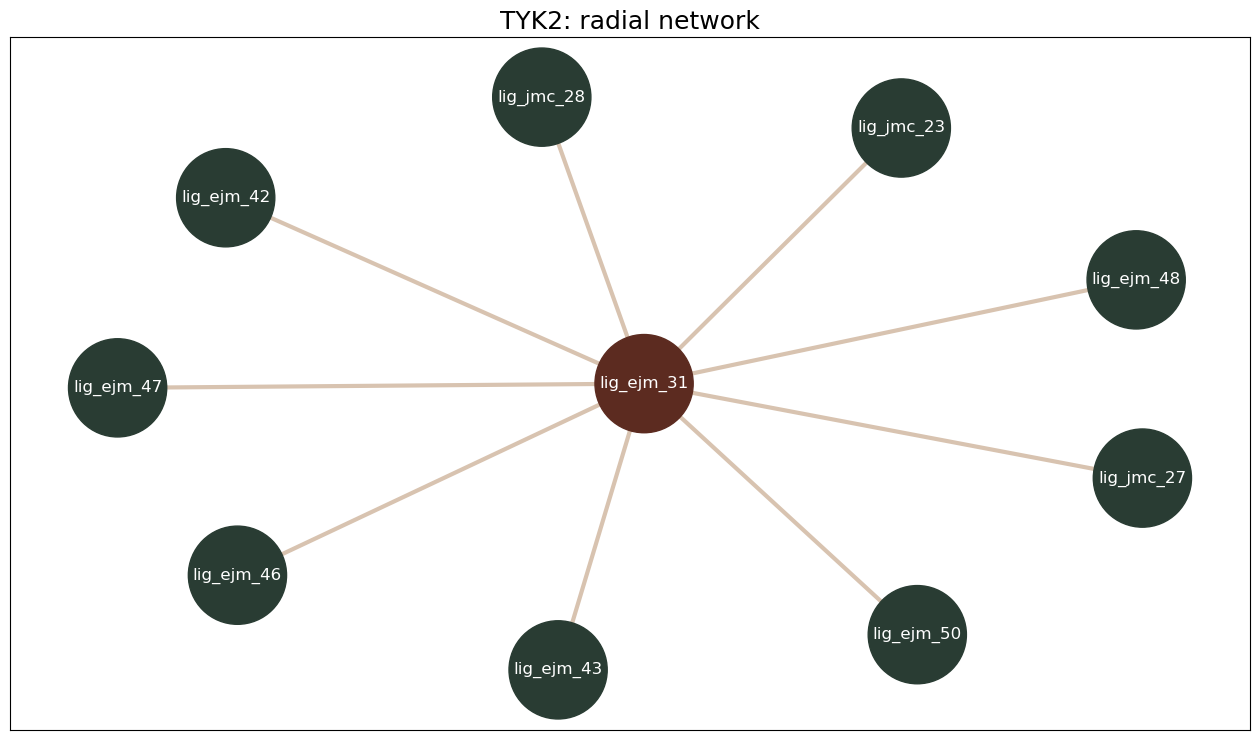
[17]:
mst_figure = konnektor.draw_ligand_network(mst_network, title="TYK2: minimal spanning tree", node_size=5000)
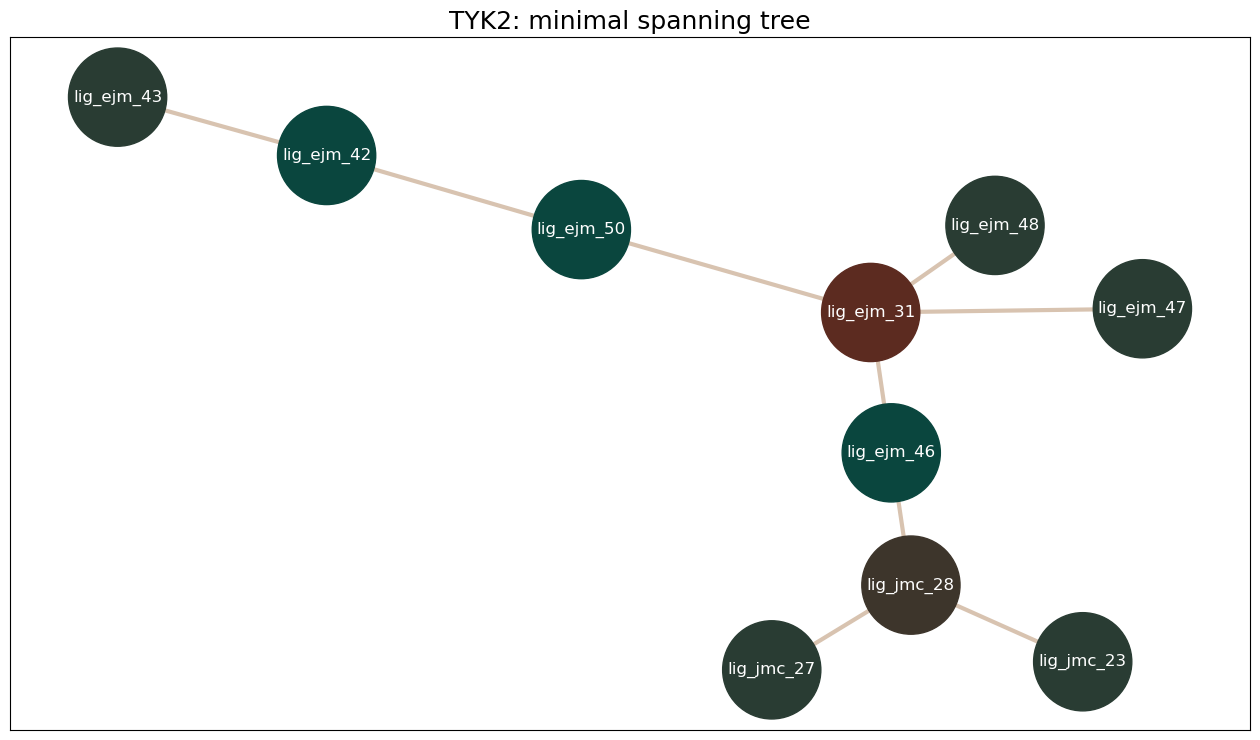
[18]:
lomap_figure = konnektor.draw_ligand_network(lomap_network, title="TYK2: LOMAP network", node_size=5000)
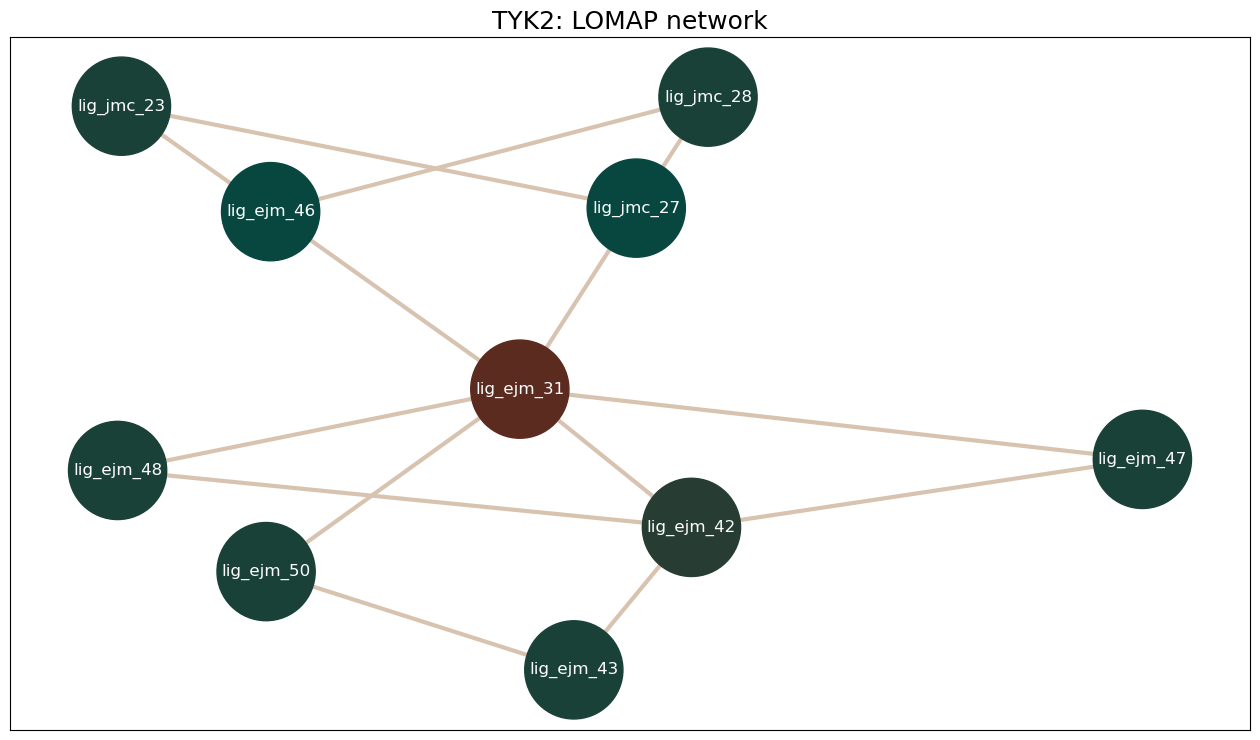
[19]:
for edge in sorted(mst_network.edges, key=lambda edge: edge.annotations["score"]):
    print(f"{edge.componentA.name} – {edge.componentB.name}: {edge.annotations['score']:.2f}")
lig_ejm_31 – lig_ejm_48: 0.30
lig_ejm_31 – lig_ejm_47: 0.33
lig_ejm_31 – lig_ejm_46: 0.37
lig_ejm_31 – lig_ejm_50: 0.90
lig_ejm_46 – lig_jmc_28: 0.90
lig_ejm_42 – lig_ejm_43: 0.90
lig_ejm_42 – lig_ejm_50: 0.95
lig_jmc_27 – lig_jmc_28: 0.95
lig_jmc_23 – lig_jmc_28: 0.95
Sorting the MST edges by score shows three edges that score much lower than the rest. lig_ejm_47 and lig_ejm_48 are each connected only through one of them. Because a minimal spanning tree always includes each ligand’s best-scoring edge, this means neither ligand has a high-scoring partner anywhere in the series, so in all three networks they are connected only through lower-scoring edges. Edges like these are worth checking closely once the results are in.
Each edge holds the two ligands and the mapping between them. Transformations are always defined as going from componentA to componentB:
[20]:
edge = next(iter(mst_network.edges))
# mappings can also be saved to file if required
edge.draw_to_file('tyk2_edge.png')

print("A:", edge.componentA.name, edge.componentA.smiles)
print("B:", edge.componentB.name, edge.componentB.smiles)
edge
A: lig_ejm_42 CCC(=O)Nc1cc(NC(=O)c2c(Cl)cccc2Cl)ccn1
B: lig_ejm_50 O=C(CO)Nc1cc(NC(=O)c2c(Cl)cccc2Cl)ccn1
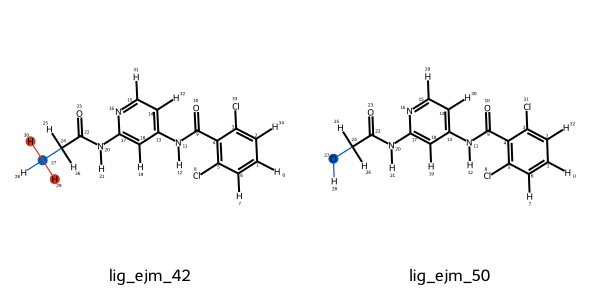
Storing the ligand network#
Created networks can easily be converted to (and also loaded from) a GraphML representation.
This can allow users of OpenFE to store the network to disk for later use.
[21]:
with open("tyk2_mst_network.graphml", "w") as graphml_file:
    graphml_file.write(mst_network.to_graphml())
Learn more:
User guide: Creating atom mappings – how atom mappers and scorers work, and how to choose between them.
How to: Plan a ligand network – generating networks with the available planners.
How to: Define a ligand network explicitly – choosing the edges yourself.
How to: Visualise a ligand network – inspecting networks and their atom mappings in 2D and 3D.
7. Protocol settings#
A Protocol defines how a free energy difference is computed: the force fields, sampling method, simulation lengths and so on. Its behaviour is controlled by a settings object, and default_settings() gives the recommended defaults. The settings are grouped by what they control:
[22]:
from openfe.protocols.openmm_rfe import RelativeHybridTopologyProtocol

settings = RelativeHybridTopologyProtocol.default_settings()
for name in type(settings).model_fields:
    print(f"{name:25s}: {type(getattr(settings, name)).__name__}")
forcefield_settings      : OpenMMSystemGeneratorFFSettings
thermo_settings          : ThermoSettings
protocol_repeats         : int
solvation_settings       : OpenMMSolvationSettings
partial_charge_settings  : OpenFFPartialChargeSettings
lambda_settings          : LambdaSettings
alchemical_settings      : AlchemicalSettings
simulation_settings      : MultiStateSimulationSettings
engine_settings          : OpenMMEngineSettings
integrator_settings      : IntegratorSettings
output_settings          : MultiStateOutputSettings
Each group can be inspected in the same way, for example the simulation lengths and sampler:
[23]:
settings.simulation_settings
{'early_termination_target_error': {'unit': 'kilocalorie_per_mole', 'val': 0.0},
 'equilibration_length': {'unit': 'nanosecond', 'val': 1.0},
 'minimization_steps': 5000,
 'n_replicas': 11,
 'production_length': {'unit': 'nanosecond', 'val': 5.0},
 'real_time_analysis_interval': {'unit': 'picosecond', 'val': 250.0},
 'real_time_analysis_minimum_time': {'unit': 'picosecond', 'val': 500.0},
 'sampler_method': 'repex',
 'sams_flatness_criteria': 'logZ-flatness',
 'sams_gamma0': 1.0,
 'time_per_iteration': {'unit': 'picosecond', 'val': 2.5}}
[24]:
settings.solvation_settings
{'box_shape': 'dodecahedron',
 'box_size': None,
 'box_vectors': None,
 'number_of_solvent_molecules': None,
 'solvent_model': 'tip3p',
 'solvent_padding': {'unit': 'nanometer', 'val': 1.5}}
The defaults are a good starting point for most systems. The settings most often changed are the simulation length (simulation_settings.production_length), the number of independent repeats (protocol_repeats), the number of λ windows (lambda_settings.lambda_windows), the solvent padding and box shape (solvation_settings.solvent_padding and solvation_settings.box_shape) and the force fields (forcefield_settings). See Choose and configure a
protocol for how to change them, and the settings reference for every option.
Here we change one setting for the whole campaign: the small molecule force field, to OpenFF 2.3.0, to match the AshGC charges assigned in section 4.
[25]:
base_settings = RelativeHybridTopologyProtocol.default_settings()
base_settings.forcefield_settings.small_molecule_forcefield = "openff-2.3.0"
Adapting settings to each transformation#
Some settings should depend on the transformation itself. RelativeHybridTopologyProtocol._adaptive_settings applies the same recommendations the CLI uses, starting from our base settings:
If both end states contain a protein, the solvent padding is reduced from 1.5 nm to 1 nm. The protein already fills much of the box, so the extra water would only slow the simulation down.
If the ligands differ in net charge, explicit charge correction is switched on, and the protocol uses 22 λ windows with 20 ns of production per window.
Because these choices depend on the end states and the mapping, the adaptive settings are applied when the transformations are created, in the next section. The leading underscore means the method is not yet part of the public API, so its name may change in a future release.
Learn more:
How to: Choose and configure a protocol – picking a protocol and changing its settings.
Reference: Relative Hybrid Topology Protocol settings – every setting and its default value.
8. Creating transformations#
One transformation per leg and edge#
Each end state of a transformation is a ChemicalSystem: a container for the Components present in that state. For the complex leg, this is the ligand, the protein and the solvent; for the solvent leg, it is the ligand and the solvent.
A Transformation combines two ChemicalSystems, the mapping between them, and the protocol. For each leg of each edge in the network, we create the two end states, adapt the settings to them, and create the transformation. We use the MST network here, as the precomputed results analysed in section 10 were generated from it.
[26]:
legs = {
    "solvent": {"solvent": solvent},
    "complex": {"protein": protein, "solvent": solvent},
}

transformations = []
for edge in mst_network.edges:
    for leg_name, leg_components in legs.items():
        state_a = openfe.ChemicalSystem({"ligand": edge.componentA, **leg_components})
        state_b = openfe.ChemicalSystem({"ligand": edge.componentB, **leg_components})

        settings = RelativeHybridTopologyProtocol._adaptive_settings(
            stateA=state_a,
            stateB=state_b,
            mapping=edge,
            initial_settings=base_settings,
        )

        transformations.append(
            openfe.Transformation(
                stateA=state_a,
                stateB=state_b,
                mapping=edge,
                protocol=RelativeHybridTopologyProtocol(settings=settings),
                name=f"rbfe_{edge.componentA.name}_{leg_name}_{edge.componentB.name}_{leg_name}",
            )
        )

print(f"{len(transformations)} transformations")
18 transformations
We can check what the adaptive settings did. The complex legs have the smaller padding, and none of the TYK2 edges change net charge, so no transformation needed the charge-change settings:
[27]:
for transformation in transformations[:2]:
    print(transformation.name, transformation.protocol.settings.solvation_settings.solvent_padding)

charge_changes = [edge for edge in mst_network.edges if edge.get_alchemical_charge_difference() != 0]
print(f"Charge-changing edges: {len(charge_changes)}")
rbfe_lig_ejm_42_solvent_lig_ejm_50_solvent 1.5 nanometer
rbfe_lig_ejm_42_complex_lig_ejm_50_complex 1 nanometer
Charge-changing edges: 0
Together, the transformations form an AlchemicalNetwork, which describes the whole campaign:
[28]:
alchemical_network = openfe.AlchemicalNetwork(edges=transformations, name="tyk2_rbfe")
Writing transformations to disk#
Each transformation is written to its own JSON file, which openfe quickrun takes as input:
[29]:
import pathlib

transformation_dir = pathlib.Path("tyk2_json")
transformation_dir.mkdir(exist_ok=True)

for transformation in transformations:
    transformation.to_json(transformation_dir / f"{transformation.name}.json")

sorted(path.name for path in transformation_dir.iterdir())[:4]
[29]:
['lig_ejm_31_lig_ejm_47_complex.json',
 'lig_ejm_31_lig_ejm_47_solvent.json',
 'rbfe_lig_ejm_31_complex_lig_ejm_46_complex.json',
 'rbfe_lig_ejm_31_complex_lig_ejm_47_complex.json']
Validating the inputs#
Before submitting a campaign, it is worth checking that the inputs are consistent with each other and with the protocol settings.
Components and protocols have a validate() method, which raises an error if something is wrong and does nothing otherwise.
ProteinComponent.validate() looks for missing residues or caps by flagging any peptide bond longer than 3 Å. The TYK2 protein passes:
[30]:
protein.validate()
Protocol.validate() checks a pair of end states and their mapping against the protocol. For the Relative Hybrid Topology Protocol, this includes checking that the end states differ by exactly one small molecule, that there is a mapping between the two ligands, that it maps at least four heavy atoms and does not break or form any bonds, and that every Component passes its own validate(). Creating a Transformation does not run these checks, so we run them on every transformation:
[31]:
for transformation in transformations:
    transformation.protocol.validate(
        stateA=transformation.stateA,
        stateB=transformation.stateB,
        mapping=transformation.mapping,
    )
print(f"All {len(transformations)} transformations passed validation")
All 18 transformations passed validation
The settings are checked too. Here we increase the number of λ windows without increasing the number of replicas:
[32]:
inconsistent_settings = RelativeHybridTopologyProtocol.default_settings()
inconsistent_settings.lambda_settings.lambda_windows = 15

transformation = transformations[0]
try:
    RelativeHybridTopologyProtocol(settings=inconsistent_settings).validate(
        stateA=transformation.stateA,
        stateB=transformation.stateB,
        mapping=transformation.mapping,
    )
except ValueError as error:
    print(error)
Number of replicas in ``simulation_settings``: 11 must equal the number of lambda windows in lambda_settings: 15.
Learn more:
User guide: Alchemical networks: planning a simulation campaign – how chemical systems, transformations and networks fit together.
User guide: Components, Chemical Systems and Thermodynamic cycles - which component types exist, and how chemical systems define the end states of each leg of a calculation.
How to: Dumping a Transformation to JSON – writing transformations to files to run elsewhere, for example on an HPC cluster.
9. Running the calculations#
Each transformation JSON is run with openfe quickrun:
openfe quickrun tyk2_json/lig_ejm_31_solvent_lig_ejm_47_solvent.json \
    -o results/lig_ejm_31_solvent_lig_ejm_47_solvent.json \
    -d results/lig_ejm_31_solvent_lig_ejm_47_solvent/
-o is the results JSON, holding the free energy estimate and uncertainty, and -d is the directory for the simulation files (trajectories, analysis plots and so on). By default each transformation runs three independent repeats, whose spread gives the uncertainty in the estimate.
We don’t run the simulations in this notebook: even one leg takes hours on a GPU. Instead, section 10 uses precomputed results. In a real campaign, you would typically submit each transformation as a separate job on an HPC cluster.
The same campaign from the CLI#
Everything in sections 4 to 8 can also be done in a single CLI command, using the default choices (Kartograf mapper, MST network, default (adaptive) protocol settings):
openfe plan-rbfe-network -M inputs/tyk2_ligands.sdf -p inputs/tyk2_protein.pdb -o tyk2_cli/
These choices can be customised with a YAML settings file passed via -s.
Learn more:
Tutorial: RBFE with the CLI – the same campaign set up and run entirely from the command line.
User guide: Customising CLI planning with YAML settings – changing the mapper, network and charge method used by the CLI.
User guide: Execution with quickrun – running transformation files, the output directory, resuming halted jobs and job submission scripts.
10. Results#
Fetching precomputed results#
These results come from running the TYK2 network with the CLI defaults:
[33]:
import locale
locale.getpreferredencoding = lambda: "UTF-8"  # needed on Google Colab only

!openfe fetch rbfe-tutorial-results
!tar -xf rbfe_results.tar.gz
/Users/hannahbaumann/.local/share/mamba/envs/openfe_dev/lib/python3.13/pty.py:95: DeprecationWarning: This process (pid=23951) is multi-threaded, use of forkpty() may lead to deadlocks in the child.
  pid, fd = os.forkpty()
Fetching /Users/hannahbaumann/.local/share/mamba/envs/openfe_dev/lib/python3.13/site-packages/openfecli/tests/data/rbfe_results.tar.gz
/Users/hannahbaumann/.local/share/mamba/envs/openfe_dev/lib/python3.13/pty.py:95: DeprecationWarning: This process (pid=23951) is multi-threaded, use of forkpty() may lead to deadlocks in the child.
  pid, fd = os.forkpty()
Gathering free energies#
openfe gather combines the results JSON files into a table. The --report option selects what is reported:
raw: the free energy of every leg and repeat.ddg: the relative binding free energy ΔΔG for each edge, combining both legs and averaging over repeats. The uncertainty is the standard deviation between repeats.dg: a binding free energy ΔG per ligand, derived from all ΔΔG values with a maximum likelihood estimator (MLE). These values are relative to the mean of the series, which is set to 0 kcal/mol, so they must be shifted before comparing them with experiment.
[34]:
!openfe gather results/ --report ddg -o tyk2_ddg.tsv
!cat tyk2_ddg.tsv
/Users/hannahbaumann/.local/share/mamba/envs/openfe_dev/lib/python3.13/pty.py:95: DeprecationWarning: This process (pid=23951) is multi-threaded, use of forkpty() may lead to deadlocks in the child.
  pid, fd = os.forkpty()
Loading results:  ▇▇▇▇▇▇▇▇▇▇▇▇▇▇▇▇▇▇▇▇▇▇▇▇▇▇▇▇▇▇▇▇▇▇▇▇  54/54 files
writing ddg output to 'tyk2_ddg.tsv'
ligand_i        ligand_j        DDG(i->j) (kcal/mol) uncertainty (kcal/mol)
lig_ejm_31      lig_ejm_42      0.8     0.2
lig_ejm_31      lig_ejm_46      -0.89   0.08
lig_ejm_31      lig_ejm_47      0.0     0.2
lig_ejm_31      lig_ejm_48      0.6     0.1
lig_ejm_31      lig_ejm_50      1.00    0.05
lig_ejm_42      lig_ejm_43      1.4     0.2
lig_ejm_46      lig_jmc_23      0.3     0.1
lig_ejm_46      lig_jmc_27      -0.1    0.1
lig_ejm_46      lig_jmc_28      -0.27   0.07
/Users/hannahbaumann/.local/share/mamba/envs/openfe_dev/lib/python3.13/pty.py:95: DeprecationWarning: This process (pid=23951) is multi-threaded, use of forkpty() may lead to deadlocks in the child.
  pid, fd = os.forkpty()
[35]:
!openfe gather results/ --report dg -o tyk2_dg.tsv
!cat tyk2_dg.tsv
/Users/hannahbaumann/.local/share/mamba/envs/openfe_dev/lib/python3.13/pty.py:95: DeprecationWarning: This process (pid=23951) is multi-threaded, use of forkpty() may lead to deadlocks in the child.
  pid, fd = os.forkpty()
Loading results:  ▇▇▇▇▇▇▇▇▇▇▇▇▇▇▇▇▇▇▇▇▇▇▇▇▇▇▇▇▇▇▇▇▇▇▇▇  54/54 files
writing dg output to 'tyk2_dg.tsv'
ligand  DG(MLE) (kcal/mol)      uncertainty (kcal/mol)
lig_ejm_31      -0.09   0.06
lig_ejm_42      0.7     0.1
lig_ejm_43      2.0     0.2
lig_ejm_46      -0.98   0.07
lig_ejm_47      -0.1    0.2
lig_ejm_48      0.5     0.1
lig_ejm_50      0.91    0.07
lig_jmc_23      -0.7    0.1
lig_jmc_27      -1.1    0.1
lig_jmc_28      -1.25   0.09
/Users/hannahbaumann/.local/share/mamba/envs/openfe_dev/lib/python3.13/pty.py:95: DeprecationWarning: This process (pid=23951) is multi-threaded, use of forkpty() may lead to deadlocks in the child.
  pid, fd = os.forkpty()
Learn more:
User guide: Analysis of the Relative Hybrid Topology Protocol – the diagnostic plots produced for each transformation.
Reference: openfe gather – all options and report types.
User guide: Working with networks of results – turning relative results into absolute estimates with MLE.
Checking simulation health#
Before interpreting the free energy estimates, check the simulation diagnostics for signs of insufficient sampling or structural instability. The protocol generates plots for energetic overlap, replica mixing, convergence and structural changes, including ligand RMSD and COM drift.
See the Assessing simulation health user guide for interpreting these diagnostics.
11. Analysing results with cinnabar#
cinnabar analyses networks of free energy results. It is what openfe gather --report dg uses for the MLE, and it also provides comparisons with experiment and plotting.
Loading the results#
We need the calculated ΔΔG values and, to compare with experiment, the experimental ΔG values. The experimental TYK2 data comes from the openfe-benchmarks repository:
[36]:
import json
import urllib.request

import pandas as pd

calculated = pd.read_csv("tyk2_ddg.tsv", sep="\t")

experimental_url = (
    "https://raw.githubusercontent.com/OpenFreeEnergy/openfe-benchmarks/main/"
    "openfe_benchmarks/data/benchmark_systems/jacs_set/tyk2/experimental_binding_data.json"
)
with urllib.request.urlopen(experimental_url) as response:
    experimental = json.load(response)

calculated.head()
[36]:
| ligand_i | ligand_j | DDG(i->j) (kcal/mol) | uncertainty (kcal/mol) | |
|---|---|---|---|---|
| 0 | lig_ejm_31 | lig_ejm_42 | 0.80 | 0.20 |
| 1 | lig_ejm_31 | lig_ejm_46 | -0.89 | 0.08 |
| 2 | lig_ejm_31 | lig_ejm_47 | 0.00 | 0.20 |
| 3 | lig_ejm_31 | lig_ejm_48 | 0.60 | 0.10 |
| 4 | lig_ejm_31 | lig_ejm_50 | 1.00 | 0.05 |
Both are added to a cinnabar FEMap, which holds the network of calculated and experimental values. The experimental data names ligands without the lig_ prefix, so we add it back to match our ligand names:
[37]:
from cinnabar import FEMap, plotting

fe_map = FEMap()

for _, row in calculated.iterrows():
    fe_map.add_relative_calculation(
        labelA=row["ligand_i"],
        labelB=row["ligand_j"],
        value=row["DDG(i->j) (kcal/mol)"] * unit.kilocalories_per_mole,
        uncertainty=row["uncertainty (kcal/mol)"] * unit.kilocalories_per_mole,
        source="openfe",
    )

for ligand in ligands:
    fe_map.add_experimental_measurement(
        label=ligand.name,
        value=experimental[ligand.name.removeprefix("lig_")]["dg"]["magnitude"] * unit.kilocalories_per_mole,
        uncertainty=0.0 * unit.kilocalories_per_mole,
        source="experimental",
    )

fe_map.draw_graph()
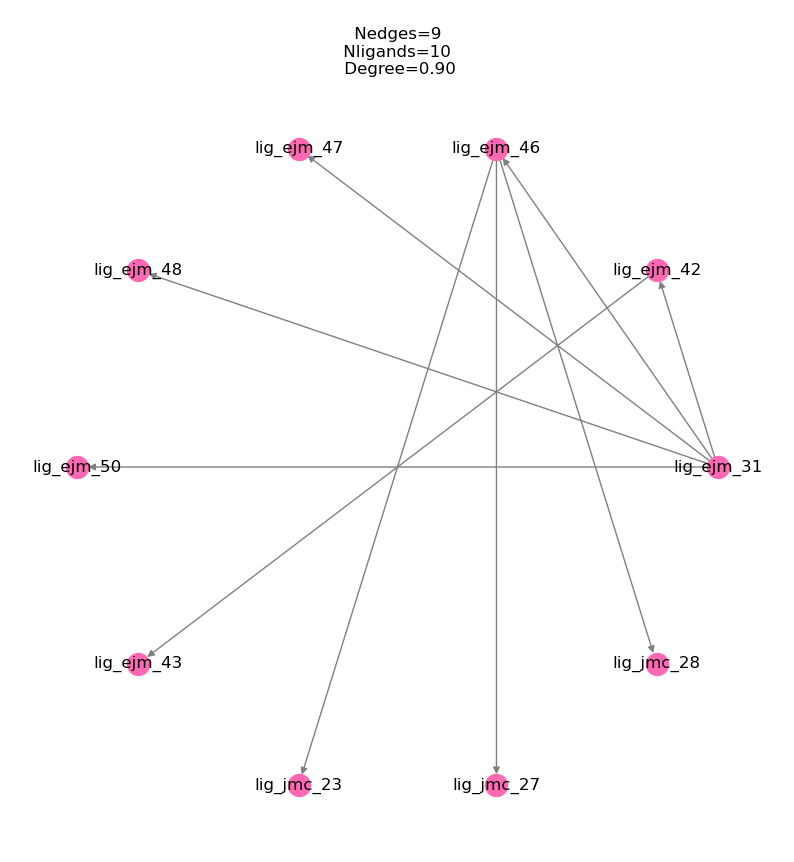
Relative free energies#
First we compare each calculated ΔΔG with the experimental ΔΔG for the same edge. Points on the diagonal indicate perfect agreement, and the shaded bands mark ±0.5 and ±1 kcal/mol.
[38]:
plotting.plot_DDGs(fe_map, source="openfe", figsize=5, title="TYK2 relative binding free energies")
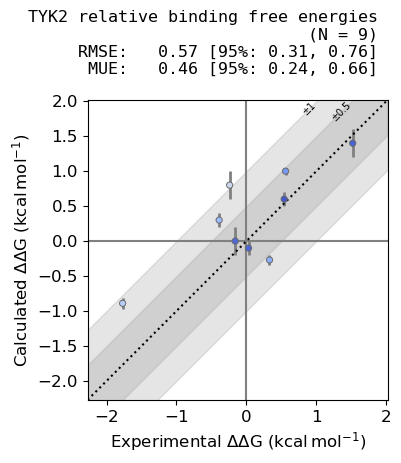
Binding free energies per ligand#
To rank compounds, we combine the ΔΔG values into a ΔG per ligand with the MLE. Because MLE values are centred on 0, we shift them by the mean experimental ΔG to place both on the same scale:
[39]:
fe_map.generate_absolute_values()

absolute = fe_map.get_absolute_dataframe()
experimental_mean = absolute[absolute["source"] == "experimental"]["DG (kcal/mol)"].mean()

plotting.plot_DGs(fe_map, source="MLE", figsize=5, shift=experimental_mean, title="TYK2 binding free energies")
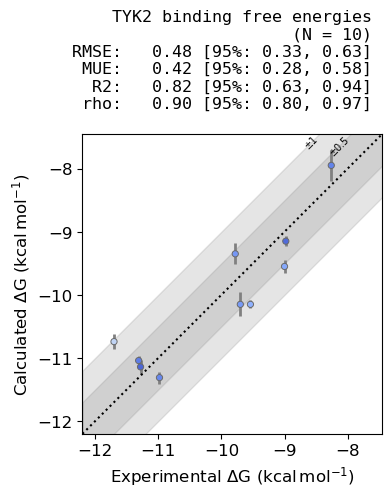
Cycle closure. In a network with cycles, such as the LOMAP network from section 6, the ΔΔG values around each closed cycle should sum to zero, which gives a useful consistency check on the results. The minimal spanning tree used here has no cycles.
Learn more:
cinnabar docs: cinnabar documentation – the full API, including statistics and plotting.
Tutorial: Plotting results with cinnabar – comparing calculated and experimental values.
12. Next steps#
In this showcase we planned a TYK2 RBFE campaign with the Python API: assigning partial charges, mapping and scoring ligand pairs, building a ligand network, configuring the protocol and writing out the transformations. We then gathered precomputed results and compared them with experiment using cinnabar.
To go further:
Step-by-step tutorials: RBFE with the CLI, RBFE with the Python API, and tutorials for the other protocols.
Choosing a protocol and checking what it supports: Protocols.
How-to guides for individual tasks: the Cookbook.
Analysing trajectories: openfe-analysis loads the simulation trajectories into MDAnalysis.
Debugging failed simulations: the Troubleshooting guide covers common errors, such as related to the box size, force field parameter assignment, and NaN errors.
To learn more about the project, visit openfree.energy, or ask questions on the OpenFE discussions board.